> ## Documentation Index
> Fetch the complete documentation index at: https://watermelon.ai/docs/llms.txt
> Use this file to discover all available pages before exploring further.
# Notion template
The Notion Custom Action connects your Agent to your Notion workspace so it can retrieve information from your Notion pages and use it when answering customer questions.
This setup includes:
* A predefined OpenAPI schema for Notion
* API key authentication
* The required Notion API BaseURL
* A Notion API version header
* A health check configuration
After setting up the Action, you can validate it, activate it, and test it in the Playground.
## Set up the action
1. Go to **Actions** in Watermelon.
2. In the **Actions catalog**, click **Custom action**.
3. Click **Create new Action**.
4. Fill in the fields below.
### General details
**Action name**
`Notion Knowledge Fetch`
**Description**
`This action lets your chatbot retrieve information from your Notion pages and use it when answering customer queries.`
**BaseURL**
`https://api.notion.com/v1`
### Authentication
For **Authorization Header**, select **API key**.
For **Auth Type**, select **Bearer**.
**Token**
`YOUR-API-KEY`
Replace this with your Notion API key.
### Extra headers
Add the following extra header:
**Header name**
`Notion-Version`
**Header value**
`2022-06-28`
### Health check
**Health check URL**
`https://www.yourdomain.com/health_check`
Replace this URL with the health check endpoint you want Watermelon to use.
**Instruction**
> You should respond with the following message or a similar variation: Sorry, something went wrong on our end. Can I assist you with anything else? Please let me know how I can help.
### Schema
Paste the Notion schema into the **Schema** field:
```text theme={null}
openapi: 3.0.3
info:
title: Notion API
description: API for searching parent or child pages and databases shared with an integration.
version: 1.0.0
servers:
- url: https://api.notion.com/v1
paths:
/search:
post:
summary: Search pages and databases
description: >
Searches all parent or child pages and databases that have been shared with an integration.
requestBody:
required: true
content:
application/json:
schema:
$ref: '#/components/schemas/SearchRequest'
responses:
'200':
description: List of pages
content:
application/json:
schema:
type: array
items:
$ref: '#/components/schemas/SearchResponse'
'400':
description: Invalid request
content:
application/json:
schema:
$ref: '#/components/schemas/Error'
components:
schemas:
SearchRequest:
type: object
properties:
query:
type: string
description: The query that the API compares page and database titles against
filter:
$ref: '#/components/schemas/Filter'
sort:
$ref: '#/components/schemas/Sort'
required:
- query
SearchResponse:
type: object
properties:
object:
type: string
description: The type of object returned.
id:
type: string
description: The unique identifier of the page or database.
created_time:
type: string
format: date-time
description: The time the page or database was created.
last_edited_time:
type: string
format: date-time
description: The time the page or database was last edited.
created_by:
$ref: '#/components/schemas/CreatedBy'
last_edited_by:
$ref: '#/components/schemas/LastEditedBy'
parent:
$ref: '#/components/schemas/Parent'
url:
type: string
description: The URL of the page or database.
Error:
type: object
properties:
code:
type: string
description: Error code
message:
type: string
description: Error message
Filter:
type: object
description: Filter options for the search
properties:
property:
type: string
description: The property to filter by
value:
type: string
description: The value to filter by
Sort:
type: object
description: Sort options for the search
properties:
direction:
type: string
description: The direction to sort the values (ascending or descending)
timestamp:
type: string
description: The name of the values to sort against
CreatedBy:
type: object
properties:
object:
type: string
id:
type: string
LastEditedBy:
type: object
properties:
object:
type: string
id:
type: string
Parent:
type: object
properties:
type:
type: string
database_id:
type: string
```
Click **Validate** to check the schema.
### Example in Watermelon
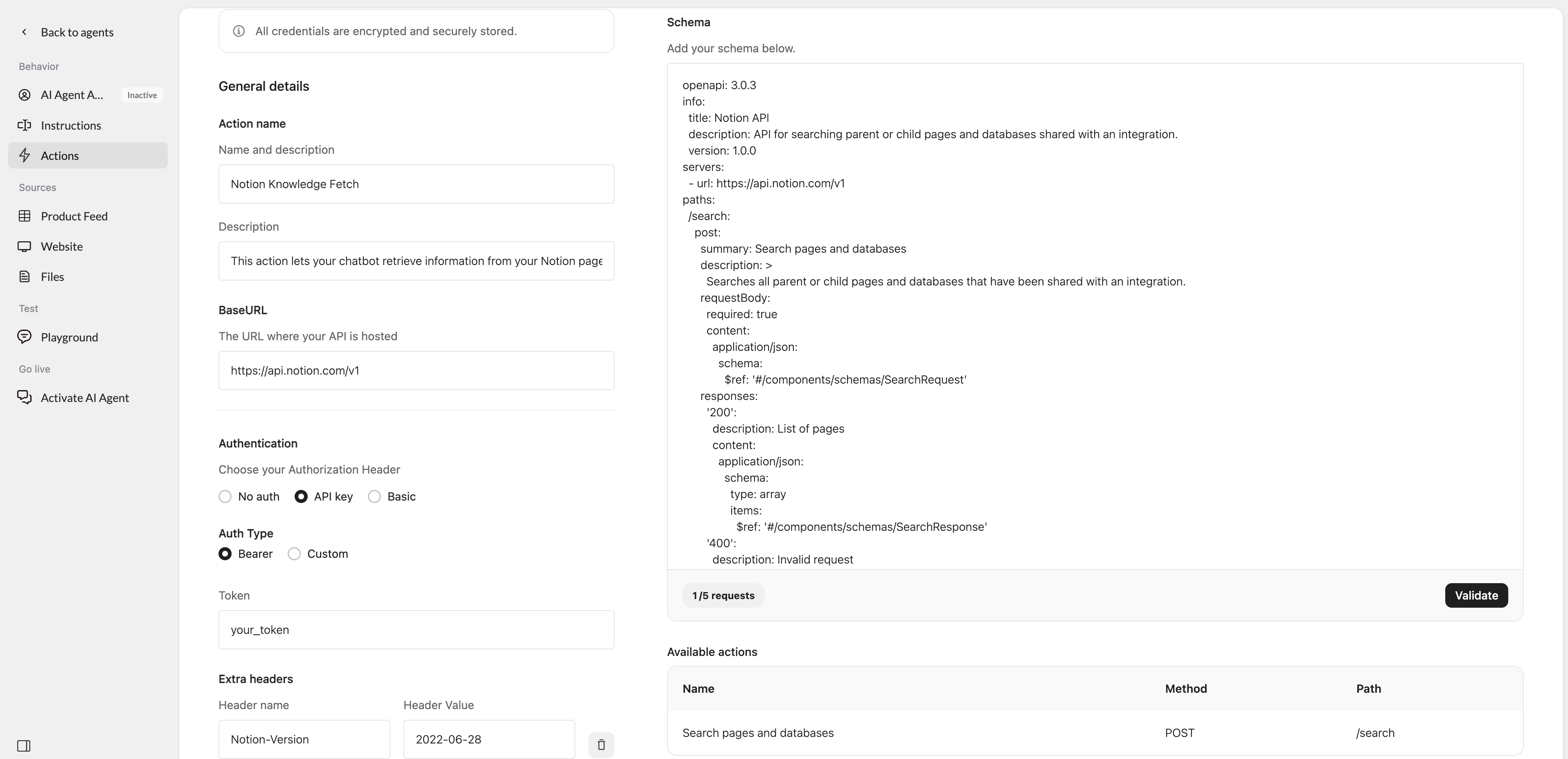 When everything is configured correctly, click **Save** and then **Activate**.
Finally, test the Action in the **Playground** to make sure your Agent can retrieve the expected information from Notion.
#### Editing an Action Template
After setting up an Action, you can adjust it to your use case. For example, you can add endpoints to the schema, change parameters, or update the name and description.
Be careful when changing authentication settings or existing endpoints, as this can prevent the Action from connecting to the API.
## Troubleshooting
| Issue | Likely cause | What to check |
| :------------------------------------------- | :-------------------------------------- | :-------------------------------------------------------- |
| **Validation failed** | Invalid OpenAPI schema | Check the schema for missing or unsupported fields. |
| **401 Unauthorized** | Incorrect credentials | Check your API key, token, username, or password. |
| **404 Not Found** | Incorrect endpoint | Check the BaseURL and endpoint path. |
| **Action does not return the expected data** | Schema or parameter mismatch | Check the endpoint parameters and API response structure. |
| **Health check fails** | Health check endpoint cannot be reached | Check the Health check URL and authentication. |
When everything is configured correctly, click **Save** and then **Activate**.
Finally, test the Action in the **Playground** to make sure your Agent can retrieve the expected information from Notion.
#### Editing an Action Template
After setting up an Action, you can adjust it to your use case. For example, you can add endpoints to the schema, change parameters, or update the name and description.
Be careful when changing authentication settings or existing endpoints, as this can prevent the Action from connecting to the API.
## Troubleshooting
| Issue | Likely cause | What to check |
| :------------------------------------------- | :-------------------------------------- | :-------------------------------------------------------- |
| **Validation failed** | Invalid OpenAPI schema | Check the schema for missing or unsupported fields. |
| **401 Unauthorized** | Incorrect credentials | Check your API key, token, username, or password. |
| **404 Not Found** | Incorrect endpoint | Check the BaseURL and endpoint path. |
| **Action does not return the expected data** | Schema or parameter mismatch | Check the endpoint parameters and API response structure. |
| **Health check fails** | Health check endpoint cannot be reached | Check the Health check URL and authentication. |