> ## Documentation Index
> Fetch the complete documentation index at: https://watermelon.ai/docs/llms.txt
> Use this file to discover all available pages before exploring further.
# Action templates
> Action Templates are ready-made integrations that connect your AI Agent to popular tools and APIs in just a few clicks.
## **What Are Action Templates?**
Templates are pre-built **Actions** for common systems and use cases.
Each template contains:
* A **validated OpenAPI schema**
* **Predefined authentication method**
* **Example paths and responses**
* Built-in **health check URL**
* Ready-to-use **test data**
Once added, the template behaves like any other Action — you can edit, duplicate, or extend it.
## **Available Templates**
Current templates in Watermelon include:
| **Template** | **Description** |
| :-------------------------- | :----------------------------------------------------------------------------- |
| **WooCommerce** | Retrieve product, order, or customer data from your WooCommerce store. |
| **Monta** | Connect to Monta’s API to manage EV charging points and sessions. |
| **Sendcloud** | Track shipments, fetch shipping labels, or manage orders through Sendcloud. |
| **OVIS** | Integrate OVIS order and inventory management data into your Agent. |
| **Lightspeed (GET orders)** | Retrieve recent orders directly from Lightspeed Retail or eCom. |
| **Picqer** | Fetch warehouse or stock details via Picqer’s API. |
| **Returnless** | Handle return requests and statuses automatically. |
| **Notion** | Retrieve or list database entries, pages, or notes from your Notion workspace. |
| **Shopify** | Retrieve product, order, or fulfillment data from your Shopify store. |
| **ReadMe** | Connect to API documentation stored in ReadMe to fetch structured data. |
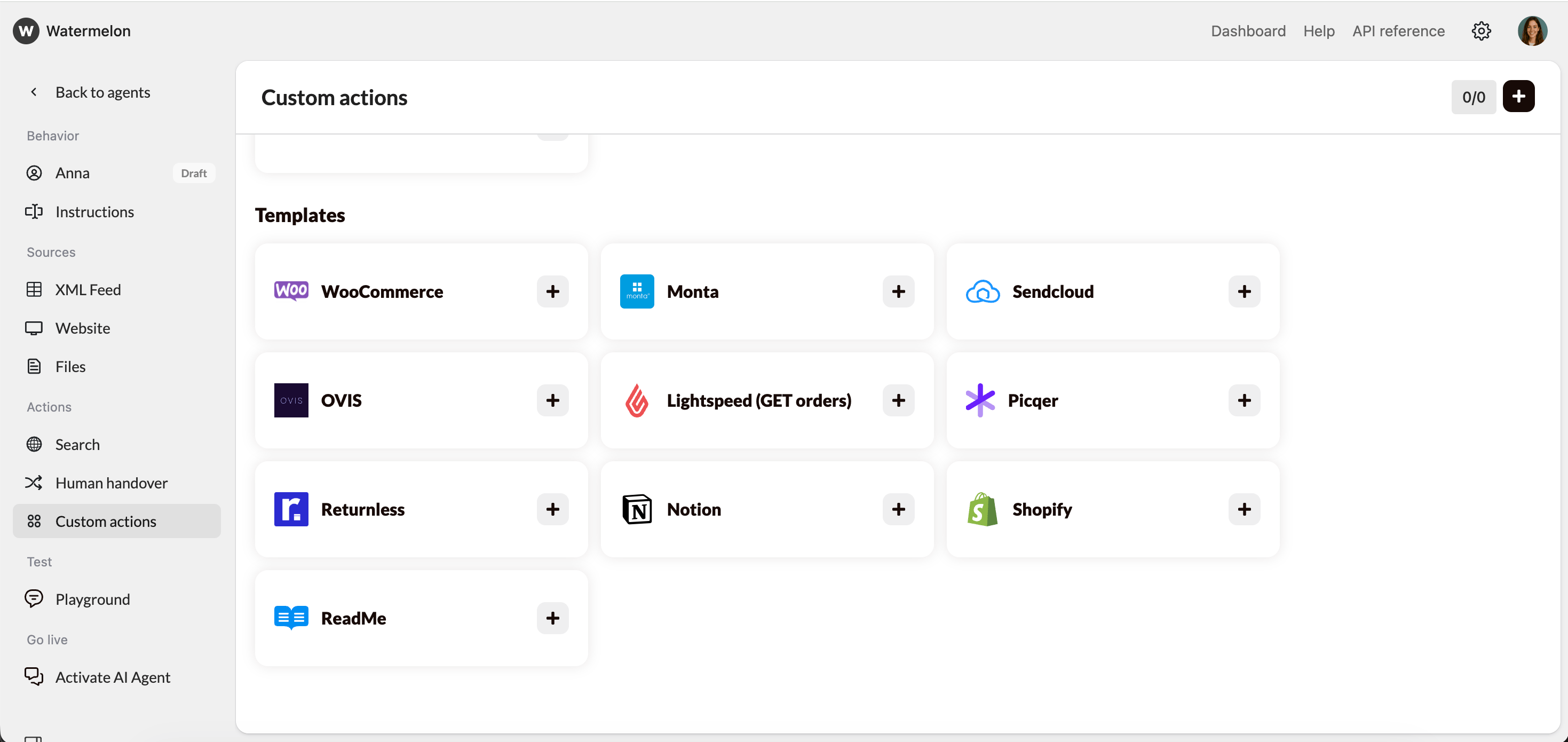 Templates are continuously added and updated. Contact Support if you’d like a new template added for your API.
## **How to Add a Template**
1. Go to **AI Agent → Custome Actions**.
2. Under **Templates**, select the integration you want (e.g. *Shopify*).
3. Click the **+** icon to add it to your Actions list.
4. Fill in the required fields (e.g. API key or authentication token).
5. Save and test it using the **Playground**.
Each template includes predefined input and response fields — no schema writing required.
## **Editing or Extending a Template**
After adding a template, you can:
* **Edit** the schema to adjust parameters or endpoints.
* **Add extra paths** to expand functionality (e.g. add POST /orders next to GET /orders).
* **Rename** fields to match your internal data structure.
* **Duplicate** the Action to create a versioned variant (e.g. *Lightspeed Orders v2*).
Always re-validate the schema after making changes.
## **When to Use a Template vs. Build Your Own**
| **Scenario** | **Use a Template** | **Create Your Own Action** |
| :----------------------------------------------------------- | :------------------------------------------------------------- | :------------------------------------------- |
| You use a known platform like Shopify, Notion, or Lightspeed | | |
| You need quick setup without coding | | |
| You have a custom internal API | | |
| You want to connect multiple endpoints from one system | (extend template) | |
| You want complete control over schema structure | | |
## **Best Practices**
* **Test immediately** after adding a template using real or sandbox data.
* **Don’t change authentication type** unless your API key structure differs.
* **Keep templates isolated** — avoid mixing environments (e.g. staging + production) in one Action.
* **Version your custom edits** by duplicating the Action and renaming it (e.g. “Returnless v2”).
* **Contact Support** if the base template doesn’t fit your workflow — we can create new templates upon request.
## **Troubleshooting Template Actions**
| **Issue** | **Likely Cause** | **Solution** |
| :----------------------- | :---------------------------- | :-------------------------------- |
| **Validation failed** | Schema edited incorrectly | Revert or re-import template |
| **401 Unauthorized** | Wrong API key | Recheck authentication fields |
| **404 Not Found** | Missing or invalid endpoint | Verify endpoint in API docs |
| **Playground won’t run** | Unfinished Action in Concepts | Delete draft and retry |
| **Wrong data returned** | Field mismatch | Update query parameters in schema |
Templates are continuously added and updated. Contact Support if you’d like a new template added for your API.
## **How to Add a Template**
1. Go to **AI Agent → Custome Actions**.
2. Under **Templates**, select the integration you want (e.g. *Shopify*).
3. Click the **+** icon to add it to your Actions list.
4. Fill in the required fields (e.g. API key or authentication token).
5. Save and test it using the **Playground**.
Each template includes predefined input and response fields — no schema writing required.
## **Editing or Extending a Template**
After adding a template, you can:
* **Edit** the schema to adjust parameters or endpoints.
* **Add extra paths** to expand functionality (e.g. add POST /orders next to GET /orders).
* **Rename** fields to match your internal data structure.
* **Duplicate** the Action to create a versioned variant (e.g. *Lightspeed Orders v2*).
Always re-validate the schema after making changes.
## **When to Use a Template vs. Build Your Own**
| **Scenario** | **Use a Template** | **Create Your Own Action** |
| :----------------------------------------------------------- | :------------------------------------------------------------- | :------------------------------------------- |
| You use a known platform like Shopify, Notion, or Lightspeed | | |
| You need quick setup without coding | | |
| You have a custom internal API | | |
| You want to connect multiple endpoints from one system | (extend template) | |
| You want complete control over schema structure | | |
## **Best Practices**
* **Test immediately** after adding a template using real or sandbox data.
* **Don’t change authentication type** unless your API key structure differs.
* **Keep templates isolated** — avoid mixing environments (e.g. staging + production) in one Action.
* **Version your custom edits** by duplicating the Action and renaming it (e.g. “Returnless v2”).
* **Contact Support** if the base template doesn’t fit your workflow — we can create new templates upon request.
## **Troubleshooting Template Actions**
| **Issue** | **Likely Cause** | **Solution** |
| :----------------------- | :---------------------------- | :-------------------------------- |
| **Validation failed** | Schema edited incorrectly | Revert or re-import template |
| **401 Unauthorized** | Wrong API key | Recheck authentication fields |
| **404 Not Found** | Missing or invalid endpoint | Verify endpoint in API docs |
| **Playground won’t run** | Unfinished Action in Concepts | Delete draft and retry |
| **Wrong data returned** | Field mismatch | Update query parameters in schema |