> ## Documentation Index
> Fetch the complete documentation index at: https://watermelon.ai/docs/llms.txt
> Use this file to discover all available pages before exploring further.
# Writing & Validating Schemas for AI Actions
> When you create a custom Action in Watermelon, your schema defines how your AI Agent communicates with an API — what it sends, what it expects, and how it understands responses.
A schema is essentially a **blueprint**: if it’s clear and valid, your Action will run smoothly; if not, you’ll run into validation or response errors.
This guide explains how to write a strong, valid schema that works seamlessly in Watermelon.
## **What Is a Schema?**
A schema describes:
* What your Action does (e.g., get an order, create a ticket)
* What parameters it needs (e.g., order number, email)
* What responses it expects (e.g., success, not found, server error)
Schemas in Watermelon use the **OpenAPI 3.0 standard**, which defines RESTful APIs in a structured way.
## **The Required Minimum Structure**
Your schema must contain **five core sections**:
| **Section** | **Purpose** |
| :---------- | :--------------------------------------------- |
| openapi | Defines the OpenAPI version |
| info | Describes your Action |
| servers | Lists API base URLs |
| paths | Lists available endpoints and their parameters |
| components | Defines reusable objects and response examples |
Here’s the simplest valid example:
```yaml theme={null}
openapi: "3.0.0"
info:
title: "AI Agent Integration"
version: "1.0.0"
description: "Integration between Example API and AI Agent"
servers:
- url: "https://api.example.com/v1"
description: "Production Environment"
paths:
/orders:
get:
summary: Retrieve order details
parameters:
- in: query
name: order_id
required: true
schema:
type: string
responses:
'200':
description: Successful response
components:
schemas:
Order:
type: object
properties:
id:
type: integer
example: 101
```
Use an editor that handles .yml files like Visual Studio Code. This will help you with the indentations
## **Choosing Parameter Locations**
Parameters tell your API what data you’re sending. They can live in **paths**, **queries**, or **headers**.
### **Path Parameters**
Used for identifying specific resources directly in the URL.
**Example:**
```
/orders/{order_id}
```
```
parameters:
- in: path
name: order_id
required: true
schema:
type: string
description: The order ID to retrieve.
```
### **Query Parameters**
Used for filtering or adding optional details.
**Example:**
```
/orders?status=shipped
```
```
parameters:
- in: query
name: status
required: false
schema:
type: string
description: Filter orders by status.
```
### **Header Parameters**
Used for authentication or metadata.
**Example:**
```
Authorization: Bearer
```
Authentication headers don’t go inside your schema in Watermelon — they’re added separately under **Authentication Settings** when creating the Action.
## **Defining Responses**
Your schema must include response definitions for key status codes. Each tells the AI Agent what kind of reply to expect from the API.
| **Status Code** | **Meaning** | **Required?** |
| :-------------- | :----------------------------------------- | :------------------------------------------- |
| 200 | Successful response | |
| 400 | Bad request (missing or invalid parameter) | Recommended |
| 404 | Not found | Recommended |
| 500 | Server error | Recommended |
**Example:**
```
responses:
'200':
description: Successful response with order details
content:
application/json:
schema:
$ref: '#/components/schemas/Order'
'400':
description: Invalid request
'404':
description: Order not found
'500':
description: Server error
```
## **Common YAML Mistakes**
Small syntax errors can make your schema invalid.
Here’s what to watch for:
| **Mistake** | **Description** | **Example** |
| :--------------------------------------------- | :-------------------------------------------------- | :-------------------------------------------------- |
| **Wrong indentation** | YAML is sensitive to spaces — use 2 spaces, no tabs | info:\
title: test |
| **Type mismatch** | Wrong data type for a field | type: string for a number |
| **Missing quotes** | Special characters need quotes | '3.0.0' not 3.0.0 |
| **Missing required fields** | Missing openapi, info, or paths | |
| **Inconsistent naming** | Different field names in paths and components | |
| **Enums or examples not matching actual data** | Example data should reflect real structure | |
Test your schema in [Swagger Editor](https://editor.swagger.io/) before uploading — it catches indentation and type errors instantly.
## **Validation Flow in Watermelon**
### **How to Validate**
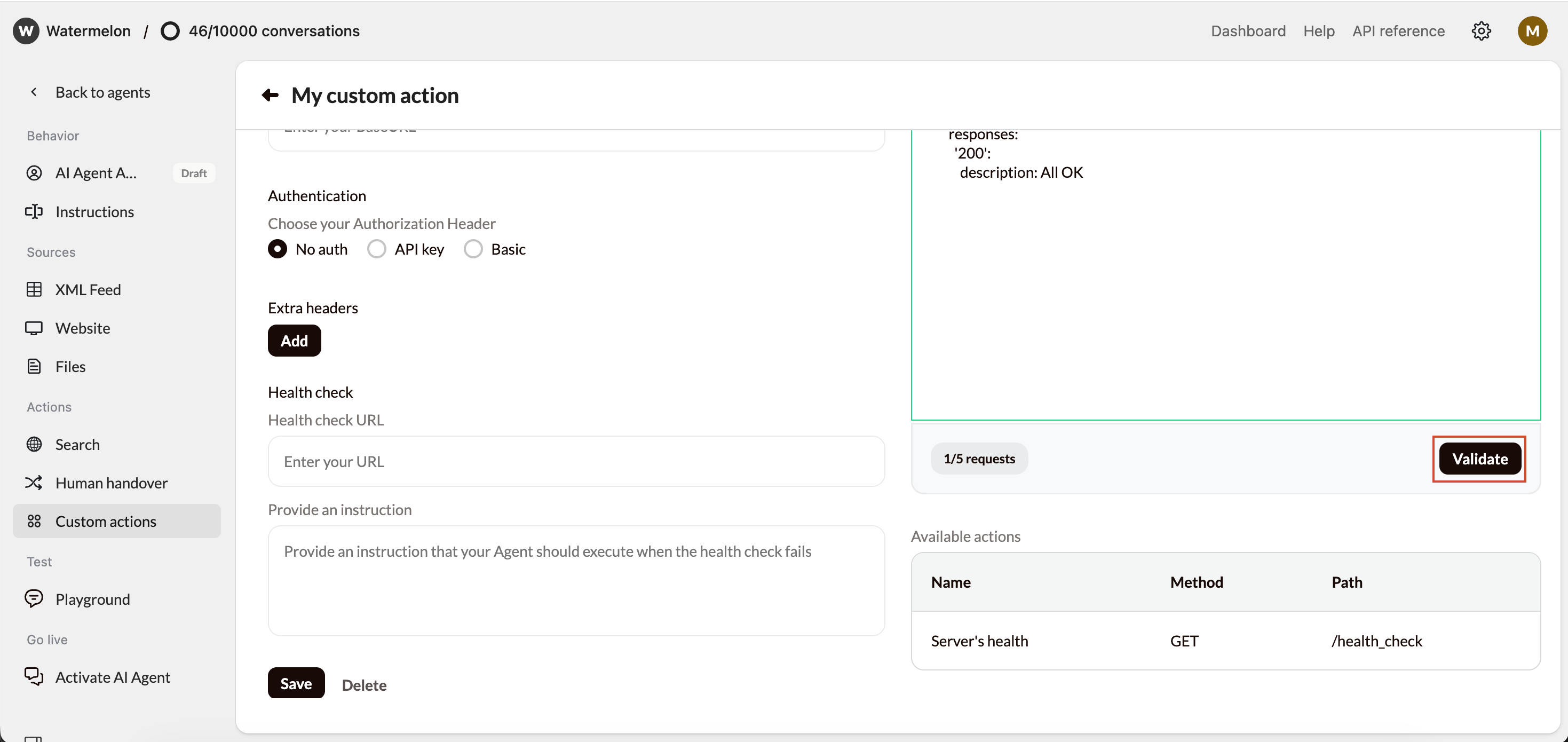
1. In your Action setup, click **Validate Schema**.
2. Watermelon checks:
* Syntax validity
* Required fields
* Correct parameter structure
* Supported OpenAPI version (3.0+)
 ### **What happens Next**
1. **Valid Schema:**
You’ll see the available actions listed automatically. They’re now ready to use.
2. **Invalid Schema:**
You’ll get an error message with:
* The **line number**
* The **column number**
* The **error type** (e.g., missing field, bad indentation)
Copy the YAML into [Swagger Editor](https://editor.swagger.io/), fix the error, and paste it back into Watermelon.
## **Quick Checklist Before You Publish**
| **Check** | **Description** |
| :------------------------ | :------------------------------------------- |
| **✔ OpenAPI version** | Use at least 3.0.0 |
| **✔ Info section** | Includes title, version, description |
| **✔ Servers** | URL(s) defined correctly |
| **✔ Paths** | Each path has summary, parameters, responses |
| **✔ Components** | All references resolved with examples |
| **✔ Indentation** | Two spaces per level, no tabs |
| **✔ Validation passed** | Schema tested in Watermelon |
| **✔ Responses realistic** | 200, 400, 404, 500 all defined |
### **What happens Next**
1. **Valid Schema:**
You’ll see the available actions listed automatically. They’re now ready to use.
2. **Invalid Schema:**
You’ll get an error message with:
* The **line number**
* The **column number**
* The **error type** (e.g., missing field, bad indentation)
Copy the YAML into [Swagger Editor](https://editor.swagger.io/), fix the error, and paste it back into Watermelon.
## **Quick Checklist Before You Publish**
| **Check** | **Description** |
| :------------------------ | :------------------------------------------- |
| **✔ OpenAPI version** | Use at least 3.0.0 |
| **✔ Info section** | Includes title, version, description |
| **✔ Servers** | URL(s) defined correctly |
| **✔ Paths** | Each path has summary, parameters, responses |
| **✔ Components** | All references resolved with examples |
| **✔ Indentation** | Two spaces per level, no tabs |
| **✔ Validation passed** | Schema tested in Watermelon |
| **✔ Responses realistic** | 200, 400, 404, 500 all defined |