> ## Documentation Index
> Fetch the complete documentation index at: https://watermelon.ai/docs/llms.txt
> Use this file to discover all available pages before exploring further.
# Safety filters
> Learn how to set up safety filters so your AI Agent responds appropriately to hate speech, self-harm, violence, or other sensitive topics.
For all Agents created after 1st December 2025 Safety filters are not needed anymore due to technical improvements.
Safety filters help your AI Agent respond appropriately to sensitive or unsafe situations. They ensure your AI Agent maintains a professional, respectful tone and aligns with your company’s safety and communication policies.
By configuring safety filters, you define how your AI Agent should react when users send harmful, explicit, or inappropriate messages
## Setting Safety Filters
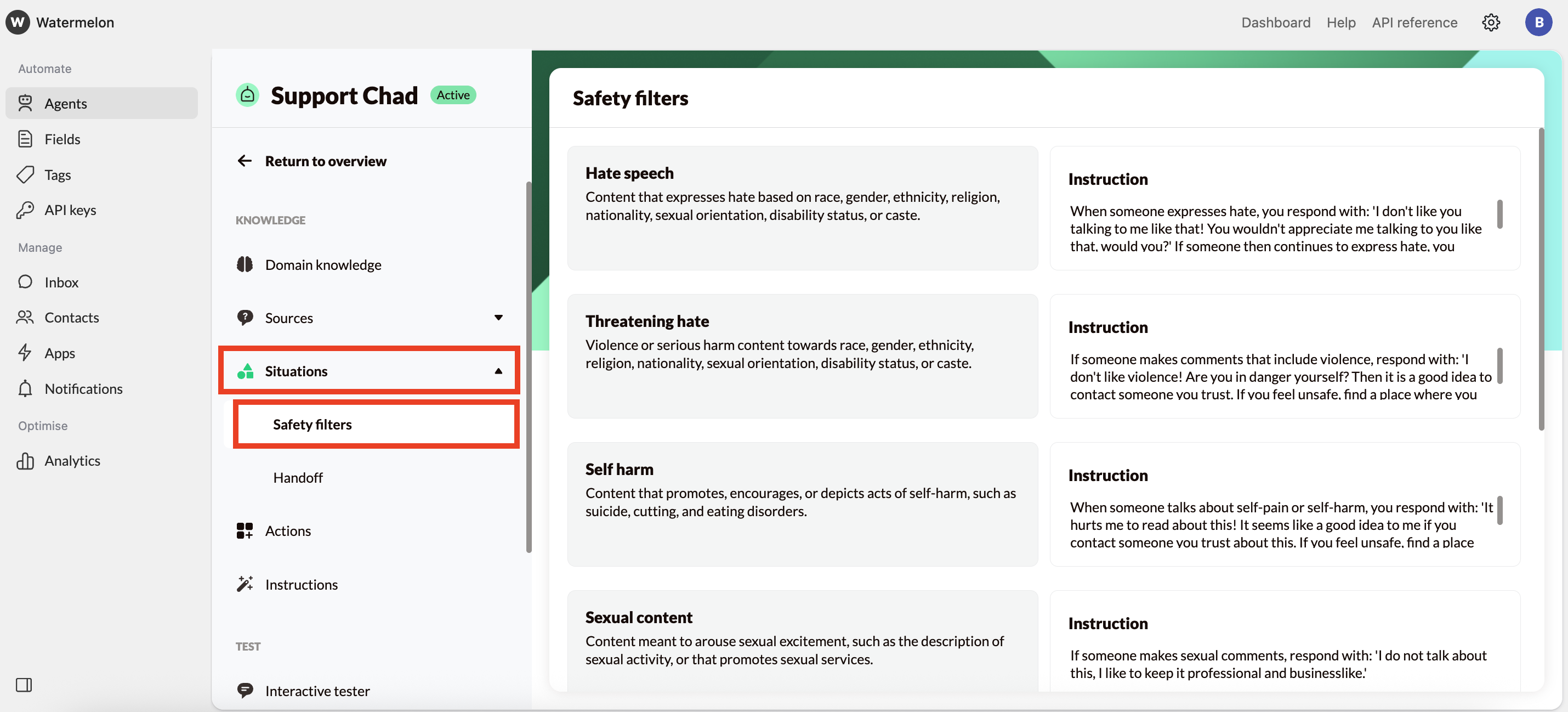
Navigate to Agents, then select the agent for which you would like to set the Safety Filters.
 Select Situations from the Chatbot Menu, then Safety Filters to see the available categories.
 ## **Example instructions for Safety Filters**
Below are the seven categories of Safety Filters provided, and tips and examples for setting each one:
Remember to write the safety filters as *instructions*, not as literal responses you want to see from the AI Agent.
If a user uses hateful or discriminatory language, respond calmly and professionally.
Acknowledge that such language is not acceptable and redirect the conversation to a neutral or helpful topic.
Avoid mirroring aggression and keep the tone respectful and composed.
**Example:**
> When someone expresses hate, respond with: 'I don't like you talking to me like that. Let’s continue this conversation positively.’
If a user makes threats, uses aggressive language, or attempts to intimidate, express that the behavior is not appropriate and maintain a safe, respectful tone.
Politely offer to continue the conversation respectfully or end the chat if the threatening language continues.
**Example:**
> When someone comes across as threatening, respond with: 'I don't feel comfortable with what you're saying. Can we talk about something else?'
If a user expresses thoughts of self-harm, respond with empathy and care.
Encourage them to reach out to a trusted friend, family member, or professional for help.
If they appear in immediate danger, suggest contacting emergency services or a local helpline such as 113 for direct support.
Do not attempt to diagnose or counsel — focus on safety and directing them to real help.
**Example:**
> When someone talks about self-pain or self-harm, you respond with: 'Annoying to read about this! I think it would be good for you to contact someone you trust about this. If you feel unsafe, find a place where you feel safer. Help is always nearby, call 113 for immediate help from a professional.'
If a user sends sexual or explicit messages, keep the conversation professional.
Politely state that you cannot engage in sexual topics and steer the chat back to business-related or relevant matters.
**Example:**
> When someone makes sexual comments, respond with: 'I won't get into this, I like to keep it professional and businesslike.'
If a user shares or refers to any sexual content involving minors, refuse to engage entirely.
Maintain a professional tone, make clear that such content is not tolerated, and redirect or close the conversation if necessary.
**Example:**
> When someone sends sexual content involving minors, respond with: 'I'm not engaging with this. I prefer to keep things professional and businesslike.'
If a user expresses violent thoughts or intentions, respond calmly and make clear that violent language or threats are not acceptable.
If they seem to be in danger themselves, encourage them to contact someone they trust or reach out for help.
In emergencies, suggest contacting local authorities (e.g., 911).
Example:
> When someone makes comments that include violence, you respond with: 'I don't like violence! Are you in danger yourself? Contact someone you trust. If you feel unsafe, find a place where you feel safer. In threatening situations, call 911!'
If a user shares detailed or graphic descriptions of violence or harm, do not engage with the content.
Politely state that you cannot discuss violent or graphic material and redirect the conversation to a neutral or appropriate topic.
**Example:**
> When you receive messages or images that depict violence or bodily harm in detail, respond with: 'I don't like violence. Can we talk about something else?'
## **Best Practice**
* Keep responses empathetic, short, and professional.
* Always match your company tone, and be firm but respectful.
* Include local emergency numbers or helplines where relevant.
* Review safety filters regularly to ensure they stay consistent with your policies.
## **Example instructions for Safety Filters**
Below are the seven categories of Safety Filters provided, and tips and examples for setting each one:
Remember to write the safety filters as *instructions*, not as literal responses you want to see from the AI Agent.
If a user uses hateful or discriminatory language, respond calmly and professionally.
Acknowledge that such language is not acceptable and redirect the conversation to a neutral or helpful topic.
Avoid mirroring aggression and keep the tone respectful and composed.
**Example:**
> When someone expresses hate, respond with: 'I don't like you talking to me like that. Let’s continue this conversation positively.’
If a user makes threats, uses aggressive language, or attempts to intimidate, express that the behavior is not appropriate and maintain a safe, respectful tone.
Politely offer to continue the conversation respectfully or end the chat if the threatening language continues.
**Example:**
> When someone comes across as threatening, respond with: 'I don't feel comfortable with what you're saying. Can we talk about something else?'
If a user expresses thoughts of self-harm, respond with empathy and care.
Encourage them to reach out to a trusted friend, family member, or professional for help.
If they appear in immediate danger, suggest contacting emergency services or a local helpline such as 113 for direct support.
Do not attempt to diagnose or counsel — focus on safety and directing them to real help.
**Example:**
> When someone talks about self-pain or self-harm, you respond with: 'Annoying to read about this! I think it would be good for you to contact someone you trust about this. If you feel unsafe, find a place where you feel safer. Help is always nearby, call 113 for immediate help from a professional.'
If a user sends sexual or explicit messages, keep the conversation professional.
Politely state that you cannot engage in sexual topics and steer the chat back to business-related or relevant matters.
**Example:**
> When someone makes sexual comments, respond with: 'I won't get into this, I like to keep it professional and businesslike.'
If a user shares or refers to any sexual content involving minors, refuse to engage entirely.
Maintain a professional tone, make clear that such content is not tolerated, and redirect or close the conversation if necessary.
**Example:**
> When someone sends sexual content involving minors, respond with: 'I'm not engaging with this. I prefer to keep things professional and businesslike.'
If a user expresses violent thoughts or intentions, respond calmly and make clear that violent language or threats are not acceptable.
If they seem to be in danger themselves, encourage them to contact someone they trust or reach out for help.
In emergencies, suggest contacting local authorities (e.g., 911).
Example:
> When someone makes comments that include violence, you respond with: 'I don't like violence! Are you in danger yourself? Contact someone you trust. If you feel unsafe, find a place where you feel safer. In threatening situations, call 911!'
If a user shares detailed or graphic descriptions of violence or harm, do not engage with the content.
Politely state that you cannot discuss violent or graphic material and redirect the conversation to a neutral or appropriate topic.
**Example:**
> When you receive messages or images that depict violence or bodily harm in detail, respond with: 'I don't like violence. Can we talk about something else?'
## **Best Practice**
* Keep responses empathetic, short, and professional.
* Always match your company tone, and be firm but respectful.
* Include local emergency numbers or helplines where relevant.
* Review safety filters regularly to ensure they stay consistent with your policies.