> ## Documentation Index
> Fetch the complete documentation index at: https://watermelon.ai/docs/llms.txt
> Use this file to discover all available pages before exploring further.
# Billing and payment information
### See your plan details
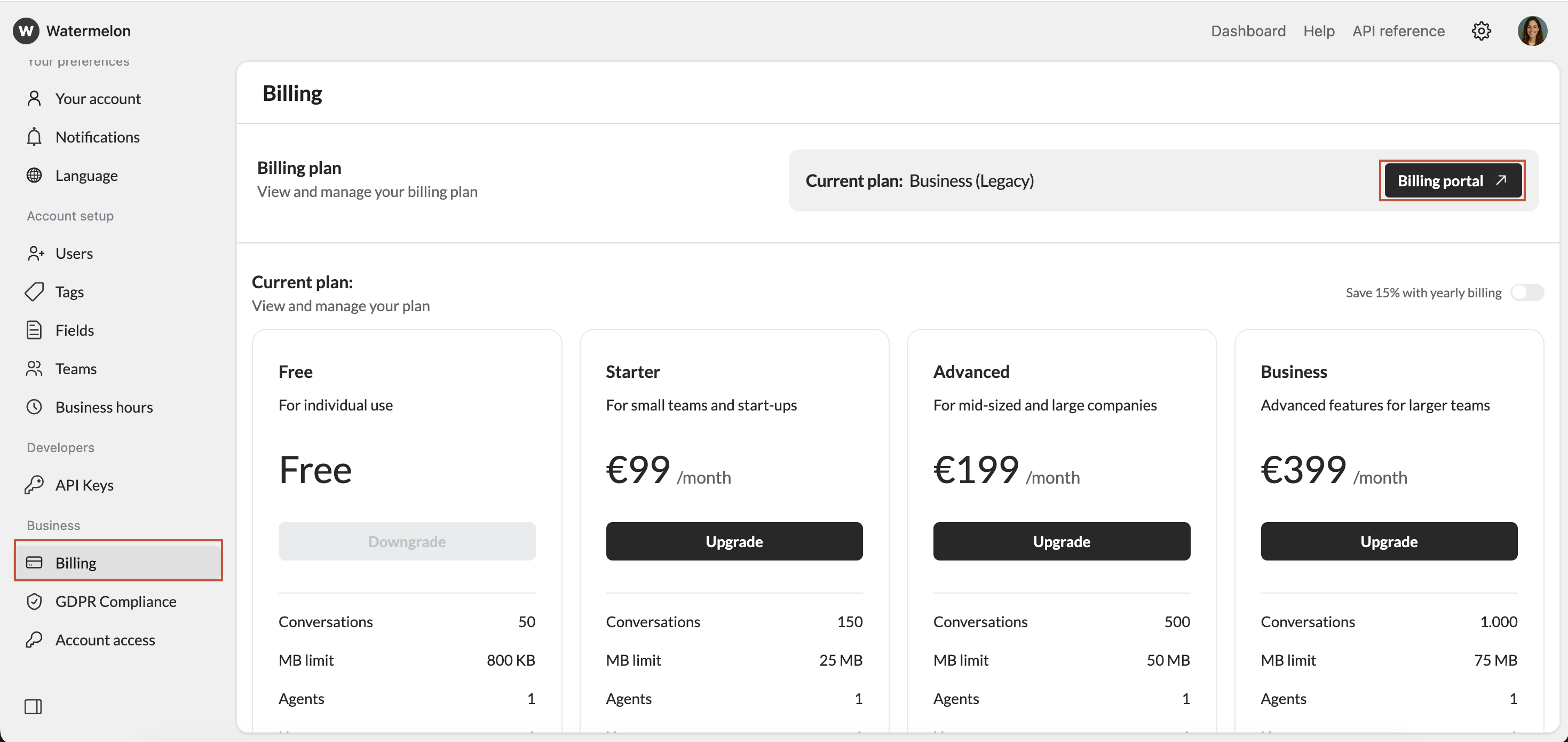
If you have a paid Watermelon account, find all your billing information in **Settings** navigate to **Billing**. You can see the available plans here and go to your **Billing portal**.
 ### **Billing method**
You can upgrade to a paid plan using the following payment methods:
* Creditcard
* iDeal
* SEPA direct debit
* Paypal
* Bancontact
* Apply pay
* Google pay
You’re charged upfront for the month or year you're about to spend on your chosen plan.
* Yearly billing gives you 15% off — equal to 2 months free.
* You’ll automatically be charged each month or year on the date you bought the paid plan.
* For example, a yearly plan bought on May 3 will renew on May 3 next year, and a monthly plan will renew on June 3.
* You can add your company details during the upgrade flow.
* After each successful payment, you will immediately receive an email with the invoice.
We can't amend issued invoices. Therefore, ensure you add all your billing details correctly **before** hitting the subscribe button.
### **Manage your subscription**
Everything you need to manage your Watermelon subscription is available in your **Billing portal**.
Here, you can:
* Change your plan
* Add a payment method
* Update your billing information
* Download your invoices
### **Cancel your subscription**
You can cancel your Watermelon subscription at any time by contacting our support team at [support@watermelon.ai](mailto:support@watermelon.ai). We’ll guide you through the cancellation process and help you with the next steps.
### **Refund policy**
**We don’t issue refunds for late cancellations or unused time**. If you wish to unsubscribe, you must cancel your Watermelon subscription before your prepaid period ends. Click to read more about our [**refund policy**](/help-center/plans-pricing/refund-policy).
### **FAQ**
You will be billed in EUR.
You can upgrade to a higher tier plan by opening your account, click `Menu` → `Billing` and `Upgrade` plan.
If you upgrade your plan in the middle of a billing interval:
* The new plan will take effect immediately and you will be charged immediately for the new plan. The amount due will be reduced by a prorated credit based on the time remaining in your current billing period for your current plan.
* Your billing period will remain the same and on the next billing day you will be charged the full rate.
Yes we offer free trials. Create a new account and select**Free plan** .
Stripe (our payment processor) automatically checks customers’ browser settings to determine their default language. If it is supported, the invoice will be presented in that language.
### **Billing method**
You can upgrade to a paid plan using the following payment methods:
* Creditcard
* iDeal
* SEPA direct debit
* Paypal
* Bancontact
* Apply pay
* Google pay
You’re charged upfront for the month or year you're about to spend on your chosen plan.
* Yearly billing gives you 15% off — equal to 2 months free.
* You’ll automatically be charged each month or year on the date you bought the paid plan.
* For example, a yearly plan bought on May 3 will renew on May 3 next year, and a monthly plan will renew on June 3.
* You can add your company details during the upgrade flow.
* After each successful payment, you will immediately receive an email with the invoice.
We can't amend issued invoices. Therefore, ensure you add all your billing details correctly **before** hitting the subscribe button.
### **Manage your subscription**
Everything you need to manage your Watermelon subscription is available in your **Billing portal**.
Here, you can:
* Change your plan
* Add a payment method
* Update your billing information
* Download your invoices
### **Cancel your subscription**
You can cancel your Watermelon subscription at any time by contacting our support team at [support@watermelon.ai](mailto:support@watermelon.ai). We’ll guide you through the cancellation process and help you with the next steps.
### **Refund policy**
**We don’t issue refunds for late cancellations or unused time**. If you wish to unsubscribe, you must cancel your Watermelon subscription before your prepaid period ends. Click to read more about our [**refund policy**](/help-center/plans-pricing/refund-policy).
### **FAQ**
You will be billed in EUR.
You can upgrade to a higher tier plan by opening your account, click `Menu` → `Billing` and `Upgrade` plan.
If you upgrade your plan in the middle of a billing interval:
* The new plan will take effect immediately and you will be charged immediately for the new plan. The amount due will be reduced by a prorated credit based on the time remaining in your current billing period for your current plan.
* Your billing period will remain the same and on the next billing day you will be charged the full rate.
Yes we offer free trials. Create a new account and select**Free plan** .
Stripe (our payment processor) automatically checks customers’ browser settings to determine their default language. If it is supported, the invoice will be presented in that language.