> ## Documentation Index
> Fetch the complete documentation index at: https://watermelon.ai/docs/llms.txt
> Use this file to discover all available pages before exploring further.
# Watermelon Partner Program
> Earn by sharing Watermelon with your network. Receive 25% commission in the first year, while your client gets 10% discount.
## Partner Program Commission
* 25% commission during the first year
* 10% discount for your client
* Fair and transparent attribution
* Your own partner dashboard
* Monthly payouts
* Ready-to-use promotional materials
***
## How does it work?
Become a partner and start sharing referrals in 3 simple steps:
1. Make sure you have a Watermelon account. You can create one at [**https://app.watermelon.ai**](https://app.watermelon.ai) and complete the onboarding.
2. Go to your **Partner Dashboard**: [https://app.watermelon.ai/partner](https://app.watermelon.ai/partner)
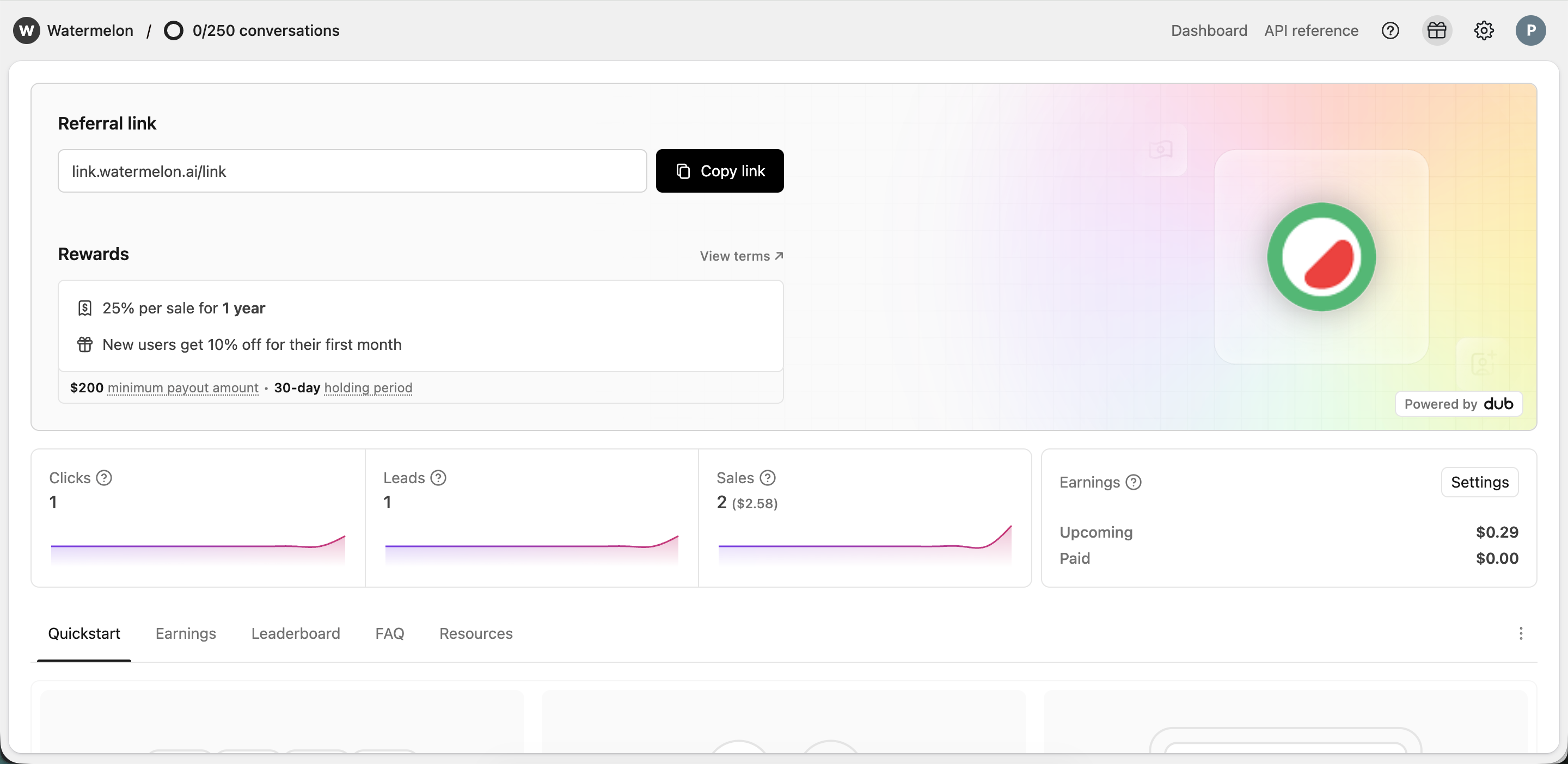 Copy your unique partner link from your dashboard and share it with your network.
Your referral is successful when someone signs up through your link and becomes a paying Watermelon customer.
Your client receives **10% discount**, and you earn **25% commission during their first year**.
1. Go to your [**Partner Dashboard**](https://app.watermelon.ai/partner)
2. Scroll down and click **“Connect payouts”**
3. Create your Dub account (or log in if you already have one)
4. Connect your preferred payment method inside Dub
Once connected, approved commissions will be paid out according to the payout schedule.
Inside your dashboard, you can always see:
* Clicks
* Leads
* New customers
* Upcoming commissions
* Approved commissions
* Paid commissions
All payouts are securely processed through Dub.
Copy your unique partner link from your dashboard and share it with your network.
Your referral is successful when someone signs up through your link and becomes a paying Watermelon customer.
Your client receives **10% discount**, and you earn **25% commission during their first year**.
1. Go to your [**Partner Dashboard**](https://app.watermelon.ai/partner)
2. Scroll down and click **“Connect payouts”**
3. Create your Dub account (or log in if you already have one)
4. Connect your preferred payment method inside Dub
Once connected, approved commissions will be paid out according to the payout schedule.
Inside your dashboard, you can always see:
* Clicks
* Leads
* New customers
* Upcoming commissions
* Approved commissions
* Paid commissions
All payouts are securely processed through Dub.
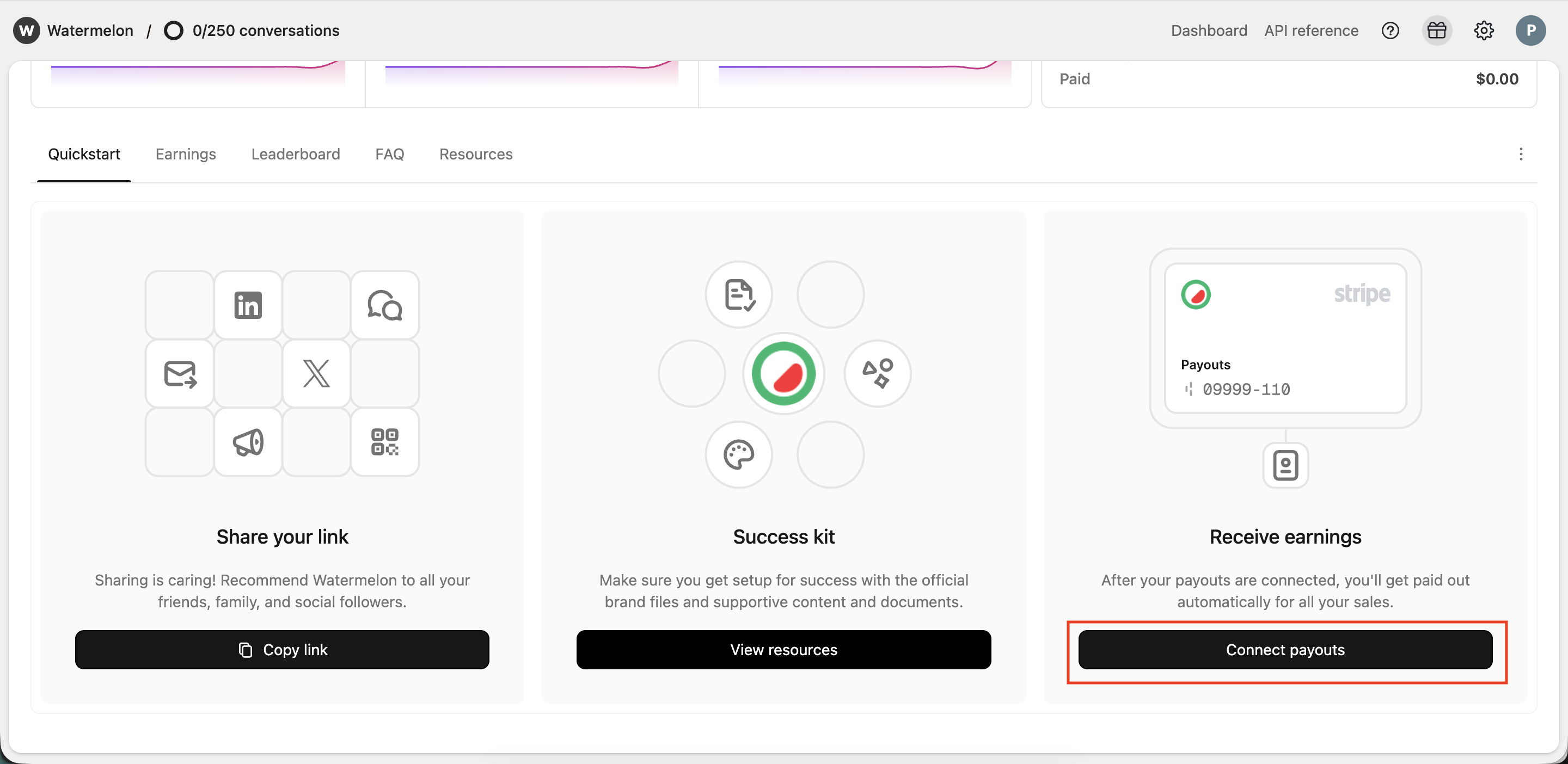 Want to know how connecting payouts work? [Read it here](https://dub.co/help/article/receiving-payouts).
***
## FAQ
For every person you refer who becomes a paying customer, you earn **25% commission during their first year**.
Your client receives **10% discount** when signing up through your partner link.
There is no limit to how many customers you can refer.
Log in to [**https://app.watermelon.ai**](https://app.watermelon.ai) and go to your **Partner Dashboard**:\
[https://app.watermelon.ai/partner](https://app.watermelon.ai/partner)
There you can track clicks, leads, new customers, and commissions in real time.
Go to your **Partner Dashboard** and click **“Connect payouts”** at the bottom of the page.
You’ll create (or log in to) your **Dub account** and connect your preferred payment method. Once connected, your approved commissions will be paid out automatically.
No. Anyone can join the Partner Program — an active paid subscription is not required.
Unlimited. There is no cap on referrals.
No. Self-referrals or creating multiple accounts to generate commission is not allowed. If detected, commissions may be revoked and your partner account may be suspended.
No. Referrals only apply to **new customers** who sign up through your partner link and upgrade to a paid plan.
No. Running paid ads (such as Google Ads) using your partner link or bidding on Watermelon brand terms is not permitted.
Violations may result in withheld or removed commissions. We encourage organic promotion within your network.
No. You may not position your partner link as a public sale, special promotion, or limited-time discount unless explicitly communicated by Watermelon.
Misleading communication may result in suspension from the Partner Program.
Our partner program uses a first-party tracking cookie (dub\_id). When someone clicks your partner link, a tracking cookie is stored on their browser. This cookie is valid for **90 days by default**.
This means that if a user signs up within 90 days after clicking your link, the referral will still be attributed to you. Please note that some browsers (such as Safari) may shorten the effective tracking duration due to browser-level privacy restrictions.
Tracking is based on first-party cookies set on our own domain.
Want to know how connecting payouts work? [Read it here](https://dub.co/help/article/receiving-payouts).
***
## FAQ
For every person you refer who becomes a paying customer, you earn **25% commission during their first year**.
Your client receives **10% discount** when signing up through your partner link.
There is no limit to how many customers you can refer.
Log in to [**https://app.watermelon.ai**](https://app.watermelon.ai) and go to your **Partner Dashboard**:\
[https://app.watermelon.ai/partner](https://app.watermelon.ai/partner)
There you can track clicks, leads, new customers, and commissions in real time.
Go to your **Partner Dashboard** and click **“Connect payouts”** at the bottom of the page.
You’ll create (or log in to) your **Dub account** and connect your preferred payment method. Once connected, your approved commissions will be paid out automatically.
No. Anyone can join the Partner Program — an active paid subscription is not required.
Unlimited. There is no cap on referrals.
No. Self-referrals or creating multiple accounts to generate commission is not allowed. If detected, commissions may be revoked and your partner account may be suspended.
No. Referrals only apply to **new customers** who sign up through your partner link and upgrade to a paid plan.
No. Running paid ads (such as Google Ads) using your partner link or bidding on Watermelon brand terms is not permitted.
Violations may result in withheld or removed commissions. We encourage organic promotion within your network.
No. You may not position your partner link as a public sale, special promotion, or limited-time discount unless explicitly communicated by Watermelon.
Misleading communication may result in suspension from the Partner Program.
Our partner program uses a first-party tracking cookie (dub\_id). When someone clicks your partner link, a tracking cookie is stored on their browser. This cookie is valid for **90 days by default**.
This means that if a user signs up within 90 days after clicking your link, the referral will still be attributed to you. Please note that some browsers (such as Safari) may shorten the effective tracking duration due to browser-level privacy restrictions.
Tracking is based on first-party cookies set on our own domain.