

- A predefined OpenAPI schema for Monta
- Basic authentication
- The required Monta API BaseURL
- A health check configuration
Set up a Monta Custom Action
Use this setup to connect your Agent to Monta and retrieve order status information.Create the Action
- Go to Actions in Watermelon.
- Find Custom action in the Actions catalog.
- Click Custom action.
- Click Create new Action.
General details
Action nameMonta Order Status Retrieval
DescriptionRetrieve order status information from Monta to answer customer questions about their orders.
BaseURLhttps://api-v6.monta.nl/
Authentication
Select Basic. UsernameEnter your Monta username. Password
Enter your Monta password.
Schema
Paste the schema below into the Schema field:openapi: 3.0.1
info:
title: Monta REST Api
description: "Monta is an api that provides the order status of the certain products"
termsOfService: https://example.com/terms
contact:
name: Monta Servicedesk
url: https://api-v6.monta.nl/
email: servicedesk@monta.nl
version: v6
x-logo:
url: openapi/logo.png
altText: Monta
servers:
- url: https://api-v6.monta.nl/
paths:
/health:
get:
tags:
- Health
summary: Rates and health of your login
description: "Provides information about the status of the API"
responses:
'200':
description: ''
'401':
description: Unauthorized
content:
text/plain:
schema:
$ref: '#/components/schemas/ProblemDetails'
application/json:
schema:
$ref: '#/components/schemas/ProblemDetails'
text/json:
schema:
$ref: '#/components/schemas/ProblemDetails'
/order/{webshoporderid}:
get:
tags:
- Order
summary: Fetches order information for given order ID
description: "To retrieve details about an order"
parameters:
- name: webshoporderid
in: path
description: ID of the order
required: true
schema:
type: string
responses:
'200':
description: ''
'400':
description: Multiple orders found
content:
text/plain:
schema:
$ref: '#/components/schemas/ProblemDetails'
application/json:
schema:
$ref: '#/components/schemas/ProblemDetails'
text/json:
schema:
$ref: '#/components/schemas/ProblemDetails'
'401':
description: Unauthorized
content:
text/plain:
schema:
$ref: '#/components/schemas/ProblemDetails'
application/json:
schema:
$ref: '#/components/schemas/ProblemDetails'
text/json:
schema:
$ref: '#/components/schemas/ProblemDetails'
'404':
description: Order not found
content:
text/plain:
schema:
$ref: '#/components/schemas/ProblemDetails'
application/json:
schema:
$ref: '#/components/schemas/ProblemDetails'
text/json:
schema:
$ref: '#/components/schemas/ProblemDetails'
components:
schemas:
OrderStatus:
description: Status of the order being represented by
Address:
required:
- CountryCode
type: object
properties:
Street:
type: string
nullable: true
HouseNumber:
type: string
nullable: true
HouseNumberAddition:
type: string
nullable: true
PostalCode:
type: string
nullable: true
City:
type: string
nullable: true
State:
type: string
nullable: true
CountryCode:
minLength: 1
type: string
Latitude:
type: number
format: double
nullable: true
Longitude:
type: number
format: double
nullable: true
additionalProperties: false
Batch:
type: object
properties:
Reference:
type: string
description: A text that references a specific batch
nullable: true
readOnly: true
Quantity:
type: integer
description: Amount of products within a batch
format: int32
readOnly: true
BestBeforeDate:
type: string
description: A date before the product in a batch is expired
format: date-time
nullable: true
readOnly: true
StockAll:
type: integer
description: All stock in warehouse excluding quarantaine
format: int32
readOnly: true
StockQuarantaine:
type: integer
description: Stock returned from orders that has been damaged or became unsellable
format: int32
readOnly: true
StockBlocked:
type: integer
description: Stock on blocked locations
format: int32
readOnly: true
StockInTransit:
type: integer
description: Stock that is received but not yet placed in warehouse
format: int32
readOnly: true
StockReserved:
type: integer
description: Stock that has been reserved by order reservations
format: int32
readOnly: true
StockAvailble:
type: integer
description: All stock on pickable locations (You may want to include StockInTransit here)
format: int32
readOnly: true
additionalProperties: false
CheckOutProduct:
type: object
properties:
SKU:
type: string
nullable: true
LengthMm:
type: integer
format: int32
nullable: true
WidthMm:
type: integer
format: int32
nullable: true
HeightMm:
type: integer
format: int32
nullable: true
WeightGrammes:
type: integer
format: int32
nullable: true
Quantity:
type: integer
format: int32
nullable: true
additionalProperties: false
Collo:
required:
- Number
type: object
properties:
Number:
type: integer
description: Number of the collo (1, 2, etc).
format: int32
WeightGrammes:
type: integer
description: Weight of the collo. Empy if unknown
format: int32
nullable: true
LengthMm:
type: integer
description: Length of the collo. Empy if unknown
format: int32
nullable: true
WidthMm:
type: integer
description: Width of the collo. Empy if unknown.
format: int32
nullable: true
HeightMm:
type: integer
description: Height of the collo. Empy if unknown.
format: int32
nullable: true
TrackAndTraceCode:
type: string
description: The Track&trace barcode for this collo
nullable: true
readOnly: true
TrackAndTraceLink:
type: string
description: The URL linking to the track&trace information web page for this collo
nullable: true
readOnly: true
DeliveryStatusDescription:
type: string
description: Delivery status is provided by the shipper to indicate the status of the delivery of the collo to the consumer.Description of the current status. Not available for all shippers.
nullable: true
readOnly: true
DeliveryStatusCode:
type: string
description: Code of the current delivery status. Not available for all shippers.See below for possible values
nullable: true
readOnly: true
DeliveryStatusUpdated:
type: string
description: When the delivery status for this collo was last updated
format: date-time
nullable: true
readOnly: true
PackageDescription:
type: string
description: Description of the material this colli is packed in. E.g. “Box 370x250x150”
nullable: true
readOnly: true
IsParent:
type: boolean
description: If this is a parent collo. A parent collo contains other colli.Eg a pallet.
nullable: true
readOnly: true
ParentNumber:
type: integer
description: If this collo is on another collo (eg a box on a pallet) this contains the number of the collo it’s on.
format: int32
nullable: true
readOnly: true
Products:
type: array
items:
$ref: '#/components/schemas/ColloProduct'
nullable: true
additionalProperties: false
ColloProduct:
type: object
properties:
Sku:
type: string
nullable: true
Quantity:
type: integer
format: int32
additionalProperties: false
ConsumerDetails:
required:
- B2B
- DeliveryAddress
type: object
properties:
DeliveryAddress:
$ref: '#/components/schemas/ContactDetails'
InvoiceAddress:
$ref: '#/components/schemas/ContactDetails'
InvoiceDebtorNumber:
type: string
description: An identifier for this consumer, for example to link to accounting software.
nullable: true
B2B:
type: boolean
description: True this is a business to business order. If omitted or false this is a business to consumer order.You can for example have seperate email templates, packing list templates, packing instructions, shipper settings and tariffs for B2B orders.If that’s not relevant for you, omit this value.
ShippingComment:
type: string
description: A message that will be placed on the packing list and on some shipping labels.Is also visible in Montaportal.
nullable: true
CommunicationLanguageCode:
type: string
description: A country code to determine in which language the attachments will be sent.
nullable: true
additionalProperties: false
ContactDetails:
required:
- City
- CountryCode
- LastName
- PostalCode
- Street
type: object
properties:
Company:
type: string
nullable: true
FirstName:
type: string
nullable: true
MiddleName:
type: string
nullable: true
LastName:
minLength: 1
type: string
description: FirstName and MiddleName can be included here if not available separately.
Street:
minLength: 1
type: string
description: HouseNumber and HouseNumberAddition can be included here if not available separately.
HouseNumber:
type: string
nullable: true
HouseNumberAddition:
type: string
nullable: true
PostalCode:
minLength: 1
type: string
City:
minLength: 1
type: string
State:
type: string
description: Required in some counties, e.g. the US
nullable: true
CountryCode:
minLength: 1
type: string
PhoneNumber:
type: string
nullable: true
EmailAddress:
type: string
description: Required if you want Monta to send information about the order to consumer by e-mail.
nullable: true
additionalProperties: false
FamilyMember:
required:
- Reason
- WebshopOrderID
type: object
properties:
WebshopOrderID:
minLength: 1
type: string
description: WebshopOrderID of child or parent order
Reason:
minLength: 1
type: string
description: Reason of split order
additionalProperties: false
InboundForecast:
required:
- Quantity
- Sku
type: object
properties:
DeliveryDate:
type: string
description: The expected delivery date of the forecast. Must be at least one day in the future.
format: date-time
nullable: true
Sku:
minLength: 1
type: string
description: The sku of the forecasted product. Specifies a unique forecast together with DeliveryDate
Quantity:
type: integer
description: The quantity forecasted for the provided sku
format: int32
Approved:
type: boolean
description: Indicates whether the inbound forecast is approved or not.When an inbound forecast is approved, received stock will not be linked to it anymore. We automatically approve an inbound forecast when the received quantity exactly matches the forecasted quantity.
nullable: true
QuantityReceived:
type: integer
description: The quantity we have received and linked to this inbound forecast
format: int32
nullable: true
readOnly: true
Reference:
type: string
description: The reference of the Inbound Forecast. Previously called “PoNumber”, which is now deprecated
nullable: true
Comment:
type: string
description: A comment for the Inbound Forecast.
nullable: true
Batch:
type: string
description: The name of a batch for the forecasted product. If a batch with this name already exists for the product with the given sku, it will be used.Otherwise an new batch will be created.The batch will be added to the forecast.
nullable: true
BatchTHT:
type: string
description: The tht of a batch for the forecasted product. If a batch with this name in combation with de tht already exists for the product with the given sku, it will be used.Otherwise an new batch will be created.The batch will be added to the forecast.
format: date-time
nullable: true
InboundForecastId:
type: integer
description: Assigned ID of the InboundForecast
format: int32
readOnly: true
ExpectedDeliveryDate:
type: string
description: The expected delivery date of the InboundForecast
format: date-time
nullable: true
readOnly: true
additionalProperties: false
InboundForecastGroup:
required:
- InboundForecasts
- Reference
type: object
properties:
Reference:
minLength: 1
type: string
description: Unique field which identifies the inboundforecast group with the purchase order.
InboundForecasts:
type: array
items:
$ref: '#/components/schemas/InboundForecast'
description: An array of inboundforecasts described as above.
SupplierCode:
type: string
description: The code for an existing Supplier. This is merely to connect a Supplier to a specific group
nullable: true
Comment:
type: string
description: A comment for the Inbound Forecast Group
nullable: true
WarehouseDisplayName:
type: string
description: The warehouse that this Inbound Forecast Group
nullable: true
Created:
type: string
description: The original creation time of the inboundforecastgroup.
format: date-time
nullable: true
readOnly: true
additionalProperties: false
IndexParameters:
required:
- Address
- Currency
- Language
- Origin
type: object
properties:
Origin:
minLength: 1
type: string
OrderValueInclVat:
type: number
format: double
nullable: true
Currency:
minLength: 1
type: string
Language:
minLength: 1
type: string
Address:
$ref: '#/components/schemas/Address'
AllowedShippers:
type: array
items:
type: string
nullable: true
Ordered:
type: string
format: date-time
nullable: true
ProductsOnStock:
type: boolean
nullable: true
MaxNumberOfPickupPoints:
type: integer
format: int32
nullable: true
Products:
type: array
items:
$ref: '#/components/schemas/CheckOutProduct'
nullable: true
NoTimeout:
type: boolean
nullable: true
OnlyPickupPoints:
type: boolean
nullable: true
HideDHLPackStations:
type: boolean
nullable: true
additionalProperties: false
Invoice:
required:
- Currency
- Paid
- WebshopFactuurID
type: object
properties:
PaymentMethodDescription:
type: string
description: Description of payment. At least one of these options is required
nullable: true
AmountInclTax:
type: number
description: Full amount inclusive tax. At least one of these options is required
format: double
nullable: true
TotalTax:
type: number
description: Amount of tax. At least one of these options is required
format: double
nullable: true
Paid:
type: boolean
description: True if invoice is paid, false if not
WebshopFactuurID:
minLength: 1
type: string
description: Invoice number
Currency:
minLength: 1
type: string
description: EUR, USD
Lines:
type: array
items:
$ref: '#/components/schemas/InvoiceLine'
nullable: true
HasData:
type: boolean
readOnly: true
additionalProperties: false
InvoiceLine:
required:
- Description
- Discount
- PaymentCosts
- Quantity
- ShippingCost
- TaxPercentage
type: object
properties:
Quantity:
type: integer
description: Quantity of product
format: int32
Description:
minLength: 1
type: string
description: Description of invoice line. Max value is 255 characters.
AmountInclTax:
type: number
description: Full amount of line inc. tax
format: double
nullable: true
AmountExclTax:
type: number
description: Full amount of line excl. tax
format: double
nullable: true
TaxPercentage:
type: number
description: VAT in decimal
format: double
TaxAmount:
type: number
description: Amount of Tax
format: double
nullable: true
TaxDescription:
type: string
description: Description about tax
nullable: true
ItemPriceInclTax:
type: number
description: Item amount of line inc. tax
format: double
nullable: true
ItemPriceExclTax:
type: number
description: Full amount of line excl. tax
format: double
nullable: true
Sku:
type: string
description: Sku of product
nullable: true
ChildSkus:
type: array
items:
type: string
description: Child Skus of a product
nullable: true
ShippingCost:
type: boolean
description: True if it is shipping cost, false if not
Discount:
type: boolean
description: True if it is discount, false if not
PaymentCosts:
type: boolean
description: True if it is a payment cost, false if not
Reference:
type: string
description: For example, ID of invoiceline from webshop
nullable: true
additionalProperties: false
LineToUpdateStatusOf:
type: object
properties:
LineId:
type: integer
format: int32
Status:
type: string
nullable: true
additionalProperties: false
Order:
required:
- ConsumerDetails
- WebshopOrderId
type: object
properties:
InternalWebshopOrderId:
type: string
description: The code of the order from the webshop.
nullable: true
WebshopOrderId:
minLength: 1
type: string
description: The code of the order, a unique identifier to be chosen by the client.
Reference:
type: string
description: A reference for this order.
nullable: true
Origin:
type: string
description: The source of the order. Different origins allow for different settings such as packing slip layout and preferred shippers.Query Monta for possible values. Not required if you have one origin (it will be selected automatically). Recommended however because more origins can be added later.
nullable: true
ConsumerDetails:
$ref: '#/components/schemas/ConsumerDetails'
PlannedShipmentDate:
type: string
description: When the order has to be shipped. If ShipOnPlannedShipmentDate is false, the order will be shipped on this day or earlier.If true then de order will be shipped exactly on the specified date.
format: date-time
nullable: true
ShipOnPlannedShipmentDate:
type: boolean
description: When true the PlannedShipmentDate is used as the shipment date of the order, when false it is used a deadline, the order will be shipped on or before the date.
nullable: true
Blocked:
type: boolean
description: A blocked order will not be processed. An order can be blocked by the client or by Monta.
nullable: true
BlockedMessage:
type: string
description: A description about why the order is blocked.
nullable: true
Quarantaine:
type: boolean
description: If this order is ordering quarantaine stock.
nullable: true
ShipperCode:
type: string
description: Om uit te lezen met welke shipper de order verzonden is. Als de klant een shipper wil kiezen moet dit via AllowedShippers.
nullable: true
readOnly: true
MailboxShipperMandatory:
type: boolean
description: Require this order to be shipped with a mailbox shipper.
nullable: true
ShipperTrackingMandatory:
type: boolean
description: Require this order to be shipped with a shipper which provides tracking info.
nullable: true
ShipperInsuranceRequired:
type: boolean
description: Required this order to be shipped with a shipper which provides insurance for the shipment.
nullable: true
ShipperInsuranceValue:
type: number
description: The insurance value for the shipment. Required if ShipperInsuranceRequired is true.
format: double
nullable: true
ShipperInsuranceCurrency:
type: string
description: The currency for the insurance value Required if ShipperInsuranceRequired is true and Invoice Currency is empty.
nullable: true
DeliveryDateRequested:
type: string
description: When you want the shipment to be delivered. This is possible depending on the shipper and the date chosen.
format: date-time
nullable: true
Lines:
type: array
items:
$ref: '#/components/schemas/OrderLine'
nullable: true
AllowedShippers:
type: array
items:
type: string
description: Array with multiple shippers Monta can choose from to use for shipping.
nullable: true
PackingServices:
type: array
items:
type: string
description: Array with (multiple) codes for additional packingservices to be executed by Monta’s orderpickers.
nullable: true
ShipperOptions:
type: array
items:
$ref: '#/components/schemas/OrderShipperOption'
description: 'Specify options for a specific shipper (such as: NoNeighbour, Signature etc.).'
nullable: true
Received:
type: string
description: When this order was received at Monta.
format: date-time
nullable: true
readOnly: true
Verified:
type: string
description: 'When this order was verified by Monta. When this field is empty, the order is not yet verified. Take care: When this field is not empty, is does not mean the order is correct.When the order was verified and it was not correct, it will be blocked. In this case the field Blocked is true.'
format: date-time
nullable: true
readOnly: true
Backorder:
type: boolean
description: True when there is not enough available stock to process this order.
nullable: true
readOnly: true
Picking:
type: boolean
description: True when the order is being picked.
readOnly: true
Picked:
type: string
description: When this order was picked completely. When empty the order is not yet picked.
format: date-time
nullable: true
readOnly: true
Shipped:
type: string
description: To set the shipped date to null. Can only be set to specific date for DropShip orders.
format: date-time
nullable: true
TrackAndTraceLink:
type: string
description: The URL linking to the track&trace information web page for this order.
nullable: true
readOnly: true
TrackAndTraceCode:
type: string
description: The tracking code of the parcel.
nullable: true
readOnly: true
ShipperDescription:
type: string
nullable: true
readOnly: true
PackingListUrl:
type: string
description: An url to a PDF document that should be printed as packing list with the order. The HTTP response of the URL should have a Content-Type header with type application/pdf. Also the file should not be bigger than 5 Mb.
nullable: true
ActionCode:
type: string
description: If you want separate invoices for groups of orders, provide the same text in this field for each order.
nullable: true
Comment:
type: string
description: Will be shown to our collegue packing this order.
nullable: true
HasStockReservation:
type: boolean
description: Nullable in case you do not want to change this during an update.
nullable: true
Deleted:
type: boolean
description: To indicate a deleted order. A deleted order can be retrieved by /order/updated_since.
nullable: true
readOnly: true
DeliveryStatusDescription:
type: string
description: Delivery status is provided by the shipper to indicate the status of the delivery of the shipment to the consumer.Description of the current status. Not available for all shippers.
nullable: true
readOnly: true
DeliveryStatusCode:
type: string
description: Code of the current delivery status. Not available for all shippers.See below for possible values.
nullable: true
readOnly: true
DropShip:
type: boolean
description: To indicate this order is a dropship order, it will be fulfilled by yourself
nullable: true
ProformaInvoiceUrl:
type: string
description: The URL linking to the pro forma invoice for this order
nullable: true
MontaEorderId:
type: integer
description: Monta eorder id.
format: int32
nullable: true
Invoice:
$ref: '#/components/schemas/Invoice'
Family:
type: array
items:
$ref: '#/components/schemas/FamilyMember'
description: A collection of parents and/or children with the properties WebshopOrderId and Reason.
nullable: true
MontaEorderGuid:
type: string
description: 'Auto-generated guid. Unique identifier. Can be used to format order-details url on the montaportal in the following format: ''montaportal.nl/Orders/Details/{MontaEorderGuid}''.'
format: uuid
nullable: true
IsRunner:
type: boolean
description: Pick flow to pick orders out the door with priority.Only allowed with own warehouse.
nullable: true
EstimatedDeliveryFrom:
type: string
format: date-time
nullable: true
EstimatedDeliveryTo:
type: string
format: date-time
nullable: true
PickbonIds:
type: array
items:
type: integer
format: int32
description: ' A collection of pickbonids.'
nullable: true
readOnly: true
Prepack:
type: boolean
description: Allows a prepack status to be set.
nullable: true
PrepackShip:
type: boolean
nullable: true
DeliveryDate:
type: string
format: date-time
nullable: true
PackingServiceText:
type: string
description: The text used for the selected packing service(s).
nullable: true
LatestDeliveryDate:
type: string
description: The latest delivery date for when the shipment must be delivered. The possibilities for this depend on the chosen carrier and on which days they make deliveries.
format: date-time
nullable: true
OrderShipmentDays:
type: integer
description: The shipment days of the order.
format: int32
nullable: true
additionalProperties: false
OrderDeleteParameters:
required:
- Note
type: object
properties:
Note:
minLength: 1
type: string
additionalProperties: false
OrderLine:
required:
- OrderedQuantity
- Sku
type: object
properties:
Sku:
minLength: 1
type: string
description: The SKU of the product to ship.
OrderedQuantity:
type: integer
description: The quantity of the product to ship.
format: int32
WebshopOrderLineId:
type: string
description: The code of the orderline from the client’s order management system.
nullable: true
Occured:
type: string
description: The exact time the line was created or deleted, depending on which endpoint you will call.
format: date-time
nullable: true
IsFlyer:
type: boolean
description: Sets the orderline to ‘Flyer’
nullable: true
Backorder:
type: boolean
description: True when there is not enough available stock for the product on this line to process this order.
nullable: true
readOnly: true
HasBeenBackorder:
type: boolean
description: True when the order has been in backorder because of the product on this line.
nullable: true
readOnly: true
Description:
type: string
description: To override the product description for this order. You can use this to show the product description in the language of the consumer. Max value is 255 characters.
nullable: true
ShippingLabels:
type: array
items:
$ref: '#/components/schemas/OrderShippingLabels'
nullable: true
BatchCode:
type: string
description: The code (reference) of the batch that you want to use for the order line.
nullable: true
additionalProperties: false
OrderShipperOption:
required:
- Code
- ShipperCode
type: object
properties:
ShipperCode:
minLength: 1
type: string
description: The code of the shipper you want to use for shipping this order
Code:
minLength: 1
type: string
description: The type of shipper option you want to use for this order
Value:
type: string
description: 'The value which is possible for a specific shipper option.However in some cases this option is required.Example: when the shipper option is a pickup point code'
nullable: true
additionalProperties: false
OrderShippingLabels:
required:
- Base64FileContent
- FileName
type: object
properties:
FileName:
minLength: 1
type: string
description: The name of the shipping label.
Base64FileContent:
minLength: 1
type: string
description: The content of the shipping label encoded in base64 format
TrackAndTraceLink:
type: string
nullable: true
TrackAndTraceCode:
type: string
nullable: true
additionalProperties: false
ProblemDetails:
type: object
properties:
Type:
type: string
nullable: true
Title:
type: string
nullable: true
Status:
type: integer
format: int32
nullable: true
Detail:
type: string
nullable: true
Instance:
type: string
nullable: true
additionalProperties: { }
Product:
required:
- Barcodes
- Description
- Sku
type: object
properties:
Sku:
minLength: 1
type: string
description: The SKU of the product, a unique identifier to be chosen by the client.
Description:
minLength: 1
type: string
description: Description of the product
Barcodes:
type: array
items:
type: string
description: The barcodes of the product, only two are supported at the moment.Must be at least one when creating a new product
WeightGrammes:
type: integer
description: The weight of de product in grams
format: int32
nullable: true
readOnly: true
LengthMm:
type: integer
description: The length (longest side) of the packaged product in millimeters
format: int32
nullable: true
readOnly: true
WidthMm:
type: integer
description: The width of the packaged product in millimeters
format: int32
nullable: true
readOnly: true
HeightMm:
type: integer
description: The height (shortest side) of the packaged product in millimeters
format: int32
nullable: true
readOnly: true
ImageUrl:
type: string
description: Url of the location of the image to download
nullable: true
Stock:
$ref: '#/components/schemas/Stock'
SupplierCode:
type: string
description: Code of the Supplier. It has to be an existing Supplier.
nullable: true
PurchasePrice:
type: number
description: The price of purchase.
format: double
nullable: true
SellingPrice:
type: number
description: The selling price of the product
format: double
nullable: true
PurchasePriceHidden:
type: number
description: The price of purchase. Not visible on MontaPortal
format: double
nullable: true
Food:
type: boolean
description: Property to set the item as a ‘food’ item
nullable: true
MinimumExpiryPeriodInbound:
type: integer
description: Minimum number of days between inbound and expiry date. (If the number of days between inbound and expiry date is below this minimum, the inbound can be rejected)
format: int32
nullable: true
MinimumExpiryPeriodOutbound:
type: integer
description: Minimum number of days between outbound order picking and expiry date. (If the number of days between outbound order picking and expiry date is below this minimum, the products will not be picked)
format: int32
nullable: true
Cool:
type: boolean
description: Products marked ‘cool’ shall be placed in cooling cells to keep it as fresh as possible
nullable: true
Note:
type: string
description: 'The note field can be used as a extra description field for a product.It is also possible to use this field on your packing list.Maximum: 2056 carachters.'
nullable: true
HStariefCode:
type: string
description: |-
Obsolete: Use HSCode instead.
Harmonized System tariff code that is used by Customs Officers woldwide to categorise products.Max length: 50 characters.
nullable: true
deprecated: true
CountryOfOrigin:
type: string
description: 'Country of the origin of the product. Max length: 50 characters'
nullable: true
PurchaseStepQty:
type: integer
description: Indicates the quantity of the product that can be fitted in a single container/box/etc.
format: int32
nullable: true
readOnly: true
RegisterSerialNumber:
type: boolean
description: This option will enforce the registration of serial numbers in the outbound process for B2C orders
nullable: true
RegisterSerialNumberB2B:
type: boolean
description: This option will enforce the registration of serial numbers in the outbound process for B2B orders
nullable: true
IsFragile:
type: boolean
description: Indicates if the product is fragile or not.
nullable: true
IsDangerous:
type: boolean
description: Indicates if the product is dangerous or not.
nullable: true
SupplierProductCode:
type: string
description: The product code that the supplier uses.
nullable: true
MinimumStock:
type: integer
description: The minimum stock of the product
format: int32
nullable: true
HSCode:
type: string
description: The Harmonized System code of the product
nullable: true
WareHouseProductSettings:
type: array
items:
$ref: '#/components/schemas/WarehouseProductSettings'
description: The minimum stock per warehouse
nullable: true
ProductId:
type: integer
description: The Monta ProductId
format: int32
nullable: true
readOnly: true
HTSCode:
type: string
description: The Harmonized Tariff Schedule code of the product
nullable: true
CustomField1:
type: string
description: A custom field of a product, in which you can put any data you want.
nullable: true
additionalProperties: false
ProductGroupPostDTO:
type: object
properties:
GroupName:
type: string
nullable: true
IdsOfProducts:
type: array
items:
type: integer
format: int32
nullable: true
UsedForTradeIn:
type: boolean
additionalProperties: false
ReadUpdatedSinceStatusEnum:
enum:
- NonDeleted
- Deleted
type: string
ReturnForecast:
required:
- Code
- Lines
- WebshopOrderId
type: object
properties:
Code:
minLength: 1
type: string
description: The code of the return forecast, a unique identifier to be chosen by the client
WebshopOrderId:
minLength: 1
type: string
description: The code of the order being returned.
Lines:
type: array
items:
$ref: '#/components/schemas/ReturnForecastLine'
description: The returning Product lines of the order being returned.
CauseDescription:
type: string
description: Description of the reason why the return is forecasted
nullable: true
Comment:
type: string
description: Comment provided by the person who is forecasting the return
nullable: true
TrackAndTraceCode:
type: string
description: The track and trace code
nullable: true
TrackAndTraceLink:
type: string
description: Link to the track and trace code
nullable: true
GeneralComment:
type: string
description: A general comment, which can be used for adding notes to this forecast. Not to be confused with 'Comment', which is for Consumer comments.
nullable: true
additionalProperties: false
ReturnForecastLine:
required:
- ReturnQuantity
- WebshopOrderLineId
type: object
properties:
WebshopOrderLineId:
minLength: 1
type: string
description: The code of the orderline being returned
ReturnQuantity:
type: integer
description: How many of the products from the order line will be returned
format: int32
ReturnReason:
type: string
description: The reason why the product was returned
nullable: true
RelatieRetourOorzaakId:
type: integer
description: The Id of the return reason of the relation. If the return Reason has a parent Id, it will be automatically set.
format: int32
nullable: true
RelatieRetourOorzaakParentId:
type: integer
description: The parent return reason relation Id. This will be automatically set in the Post and Put endpoint.
format: int32
nullable: true
CustomerComment:
type: string
description: The customer comment.
nullable: true
additionalProperties: false
ReturnLabel:
type: object
properties:
ShipperDescription:
type: string
nullable: true
TrackAndTraceCode:
type: string
nullable: true
TrackAndTraceLink:
type: string
nullable: true
Created:
type: string
format: date-time
DeliveryStatusCode:
type: string
nullable: true
DeliveryStatusDescription:
type: string
nullable: true
DeliveryStatusChangedUtc:
type: string
description: When the delivery status was last updated
format: date-time
nullable: true
EnRouteUtc:
type: string
description: When the return shipment was received by the carrier
format: date-time
nullable: true
DeliveredUtc:
type: string
description: When the return shipment was delivered
format: date-time
nullable: true
additionalProperties: false
ReturnLabelChange:
type: object
properties:
Id:
type: integer
format: int32
LabelTtCode:
type: string
nullable: true
OccuredUtc:
type: string
format: date-time
DeliveryStatusCode:
type: string
nullable: true
DeliveryStatusDescription:
type: string
nullable: true
ShipperStatusCode:
type: string
nullable: true
ShipperStatusDescription:
type: string
nullable: true
additionalProperties: false
RmaLogin:
type: object
properties:
Url:
type: string
nullable: true
ValidUntil:
type: string
format: date-time
nullable: true
IsWarranty:
type: boolean
nullable: true
IsFree:
type: boolean
nullable: true
Guid:
type: string
nullable: true
additionalProperties: false
SplitOrderRequestLine:
type: object
properties:
AmountToSplit:
type: integer
description: The quantity to split.
format: int32
Sku:
type: string
description: The Sku of the product to split.
nullable: true
additionalProperties: false
Stock:
type: object
properties:
StockInboundForecasted:
type: integer
description: Stock that is in forecast but not yet received
format: int32
nullable: true
readOnly: true
StockQuarantaine:
type: integer
description: Stock returned from orders that has been damaged or became unsellable
format: int32
nullable: true
readOnly: true
StockAll:
type: integer
description: All stock in warehouse excluding quarantaine
format: int32
nullable: true
readOnly: true
StockBlocked:
type: integer
description: Stock on blocked locations
format: int32
nullable: true
readOnly: true
StockInTransit:
type: integer
description: Stock that is received but not yet placed in warehouse
format: int32
nullable: true
readOnly: true
StockReserved:
type: integer
description: Stock that has been reserved by order reservations
format: int32
nullable: true
readOnly: true
StockInboundHistory:
type: integer
description: All stock that has been received ever, excluding stock received from returns
format: int32
nullable: true
readOnly: true
StockAvailable:
type: integer
description: All stock on pickable locations (You may want to include StockInTransit here)
format: int32
nullable: true
readOnly: true
StockSplitProduct:
type: integer
description: All stock in split products. This is the sum of all underlying split products(the child products)
format: int32
nullable: true
readOnly: true
StockWholeSaler:
type: integer
description: All stock availeble at wholesaler(s)
format: int32
nullable: true
readOnly: true
StockOpen:
type: integer
description: Stock from open orders that are not picked yet.
format: int32
nullable: true
readOnly: true
Batches:
type: array
items:
$ref: '#/components/schemas/Batch'
description: Stock from open orders that are not picked yet.
nullable: true
readOnly: true
PerWarehouse:
type: array
items:
$ref: '#/components/schemas/StockForWarehouse'
description: Stock per warehouse. Only warehouses with stock are in the list
nullable: true
readOnly: true
PerLocation:
type: array
items:
$ref: '#/components/schemas/StockForLocation'
description: Stock per location
nullable: true
readOnly: true
MaxPhysicalStock:
type: integer
description: Max physical stock
format: int32
nullable: true
readOnly: true
MinPhysicalStock:
type: integer
description: Min physical stock
format: int32
nullable: true
readOnly: true
additionalProperties: false
StockForLocation:
type: object
properties:
LocationId:
type: integer
description: A id of a specific location
format: int32
readOnly: true
LocationCode:
type: string
description: Stock returned from orders that has been damaged or became unsellable
nullable: true
readOnly: true
WarehouseId:
type: integer
description: WarehouseId where the stock is located
format: int32
readOnly: true
StockAll:
type: integer
description: All stock available on location
format: int32
nullable: true
readOnly: true
StockQuarantaine:
type: integer
description: Stock returned from orders that has been damaged or became unsellable on location
format: int32
nullable: true
readOnly: true
StockBlocked:
type: integer
description: Blocked stock on location
format: int32
nullable: true
readOnly: true
StockInTransit:
type: integer
description: Stock that is received but not yet placed in warehouse on location
format: int32
nullable: true
readOnly: true
StockInPicking:
type: integer
description: All pickable stock on location
format: int32
nullable: true
readOnly: true
MaxPhysicalStock:
type: integer
description: Max physical stock
format: int32
nullable: true
readOnly: true
MinPhysicalStock:
type: integer
description: Min physical stock
format: int32
nullable: true
readOnly: true
additionalProperties: false
StockForWarehouse:
type: object
properties:
Warehouse:
$ref: '#/components/schemas/Warehouse'
StockQuarantaine:
type: integer
format: int32
nullable: true
StockAll:
type: integer
format: int32
nullable: true
StockBlocked:
type: integer
format: int32
nullable: true
StockInTransit:
type: integer
format: int32
nullable: true
StockReserved:
type: integer
format: int32
nullable: true
StockAvailable:
type: integer
format: int32
nullable: true
StockSplitProduct:
type: integer
format: int32
nullable: true
StockOpen:
type: integer
format: int32
nullable: true
MaxPhysicalStock:
type: integer
format: int32
nullable: true
MinPhysicalStock:
type: integer
format: int32
nullable: true
additionalProperties: false
StockMutation:
required:
- Comment
- Quantity
- WarehouseGuid
- WarehouseLocationCode
type: object
properties:
Created:
type: string
format: date-time
nullable: true
WarehouseGuid:
type: string
format: uuid
WarehouseLocationCode:
minLength: 1
type: string
ProductSku:
type: string
nullable: true
Quantity:
type: integer
format: int32
Comment:
minLength: 1
type: string
additionalProperties: false
Supplier:
required:
- Code
- Title
type: object
properties:
Code:
minLength: 1
type: string
description: The code of the supplier, a unique identifier to be chosen by the client
Title:
minLength: 1
type: string
description: The title of the supplier
AddressName:
type: string
description: A full name of the supplier
nullable: true
AddressStreet:
type: string
description: Street name
nullable: true
AddressHouseNo:
type: string
description: House number
nullable: true
AddressHouseNoAddition:
type: string
description: Optional addition to a house number
nullable: true
AddressPostalCode:
type: string
description: Postal code
nullable: true
AddressCity:
type: string
description: City
nullable: true
AddressState:
type: string
description: State
nullable: true
AddressCountry:
type: string
description: Country
nullable: true
AddressPhone:
type: string
description: Phone number
nullable: true
AddressEmail:
type: string
description: Email
nullable: true
CreditorNumber:
type: string
nullable: true
Default:
type: boolean
description: Identifier if this supplier is the default supplier of the webshop
nullable: true
readOnly: true
additionalProperties: false
UpdateInboundForecast:
type: object
properties:
DeliveryDate:
type: string
description: The expected delivery date of the forecast. Must be at least one day in the future.
format: date-time
nullable: true
Sku:
type: string
nullable: true
Quantity:
type: integer
format: int32
nullable: true
Approved:
type: boolean
description: Indicates whether the inbound forecast is approved or not.When an inbound forecast is approved, received stock will not be linked to it anymore. We automatically approve an inbound forecast when the received quantity exactly matches the forecasted quantity.
nullable: true
QuantityReceived:
type: integer
description: The quantity we have received and linked to this inbound forecast
format: int32
nullable: true
readOnly: true
Reference:
type: string
description: The reference of the Inbound Forecast. Previously called “PoNumber”, which is now deprecated
nullable: true
Comment:
type: string
description: A comment for the Inbound Forecast.
nullable: true
Batch:
type: string
description: The name of a batch for the forecasted product. If a batch with this name already exists for the product with the given sku, it will be used.Otherwise an new batch will be created.The batch will be added to the forecast.
nullable: true
BatchTHT:
type: string
description: The tht of a batch for the forecasted product. If a batch with this name in combation with de tht already exists for the product with the given sku, it will be used.Otherwise an new batch will be created.The batch will be added to the forecast.
format: date-time
nullable: true
InboundForecastId:
type: integer
description: Assigned ID of the InboundForecast
format: int32
readOnly: true
ExpectedDeliveryDate:
type: string
description: The expected delivery date of the InboundForecast
format: date-time
nullable: true
readOnly: true
additionalProperties: false
UpdateInboundForecastGroup:
type: object
properties:
Reference:
type: string
nullable: true
InboundForecasts:
type: array
items:
$ref: '#/components/schemas/UpdateInboundForecast'
nullable: true
WarehouseDisplayName:
type: string
nullable: true
SupplierCode:
type: string
description: The code for an existing Supplier. This is merely to connect a Supplier to a specific group
nullable: true
Comment:
type: string
description: A comment for the Inbound Forecast Group
nullable: true
Created:
type: string
description: The original creation time of the inboundforecastgroup.
format: date-time
nullable: true
readOnly: true
additionalProperties: false
UpdateOrder:
type: object
properties:
InternalWebshopOrderId:
type: string
description: The code of the order from the webshop.
nullable: true
WebshopOrderId:
type: string
nullable: true
Reference:
type: string
description: A reference for this order.
nullable: true
Origin:
type: string
description: The source of the order. Different origins allow for different settings such as packing slip layout and preferred shippers.Query Monta for possible values. Not required if you have one origin (it will be selected automatically). Recommended however because more origins can be added later.
nullable: true
ConsumerDetails:
$ref: '#/components/schemas/ConsumerDetails'
PlannedShipmentDate:
type: string
description: When the order has to be shipped. If ShipOnPlannedShipmentDate is false, the order will be shipped on this day or earlier.If true then de order will be shipped exactly on the specified date.
format: date-time
nullable: true
ShipOnPlannedShipmentDate:
type: boolean
description: When true the PlannedShipmentDate is used as the shipment date of the order, when false it is used a deadline, the order will be shipped on or before the date.
nullable: true
Blocked:
type: boolean
description: A blocked order will not be processed. An order can be blocked by the client or by Monta.
nullable: true
BlockedMessage:
type: string
description: A description about why the order is blocked.
nullable: true
Quarantaine:
type: boolean
description: If this order is ordering quarantaine stock.
nullable: true
ShipperCode:
type: string
description: Om uit te lezen met welke shipper de order verzonden is. Als de klant een shipper wil kiezen moet dit via AllowedShippers.
nullable: true
readOnly: true
MailboxShipperMandatory:
type: boolean
description: Require this order to be shipped with a mailbox shipper.
nullable: true
ShipperTrackingMandatory:
type: boolean
description: Require this order to be shipped with a shipper which provides tracking info.
nullable: true
ShipperInsuranceRequired:
type: boolean
description: Required this order to be shipped with a shipper which provides insurance for the shipment.
nullable: true
ShipperInsuranceValue:
type: number
description: The insurance value for the shipment. Required if ShipperInsuranceRequired is true.
format: double
nullable: true
ShipperInsuranceCurrency:
type: string
description: The currency for the insurance value Required if ShipperInsuranceRequired is true and Invoice Currency is empty.
nullable: true
DeliveryDateRequested:
type: string
description: When you want the shipment to be delivered. This is possible depending on the shipper and the date chosen.
format: date-time
nullable: true
Lines:
type: array
items:
$ref: '#/components/schemas/OrderLine'
nullable: true
AllowedShippers:
type: array
items:
type: string
description: Array with multiple shippers Monta can choose from to use for shipping.
nullable: true
PackingServices:
type: array
items:
type: string
description: Array with (multiple) codes for additional packingservices to be executed by Monta’s orderpickers.
nullable: true
ShipperOptions:
type: array
items:
$ref: '#/components/schemas/OrderShipperOption'
description: 'Specify options for a specific shipper (such as: NoNeighbour, Signature etc.).'
nullable: true
Received:
type: string
description: When this order was received at Monta.
format: date-time
nullable: true
readOnly: true
Verified:
type: string
description: 'When this order was verified by Monta. When this field is empty, the order is not yet verified. Take care: When this field is not empty, is does not mean the order is correct.When the order was verified and it was not correct, it will be blocked. In this case the field Blocked is true.'
format: date-time
nullable: true
readOnly: true
Backorder:
type: boolean
description: True when there is not enough available stock to process this order.
nullable: true
readOnly: true
Picking:
type: boolean
description: True when the order is being picked.
readOnly: true
Picked:
type: string
description: When this order was picked completely. When empty the order is not yet picked.
format: date-time
nullable: true
readOnly: true
Shipped:
type: string
description: To set the shipped date to null. Can only be set to specific date for DropShip orders.
format: date-time
nullable: true
TrackAndTraceLink:
type: string
description: The URL linking to the track&trace information web page for this order.
nullable: true
readOnly: true
TrackAndTraceCode:
type: string
description: The tracking code of the parcel.
nullable: true
readOnly: true
ShipperDescription:
type: string
nullable: true
readOnly: true
PackingListUrl:
type: string
nullable: true
readOnly: true
ActionCode:
type: string
description: If you want separate invoices for groups of orders, provide the same text in this field for each order.
nullable: true
Comment:
type: string
description: Will be shown to our collegue packing this order.
nullable: true
HasStockReservation:
type: boolean
description: Nullable in case you do not want to change this during an update.
nullable: true
Deleted:
type: boolean
description: To indicate a deleted order. A deleted order can be retrieved by /order/updated_since.
nullable: true
readOnly: true
DeliveryStatusDescription:
type: string
description: Delivery status is provided by the shipper to indicate the status of the delivery of the shipment to the consumer.Description of the current status. Not available for all shippers.
nullable: true
readOnly: true
DeliveryStatusCode:
type: string
description: Code of the current delivery status. Not available for all shippers.See below for possible values.
nullable: true
readOnly: true
DropShip:
type: boolean
description: To indicate this order is a dropship order, it will be fulfilled by yourself
nullable: true
ProformaInvoiceUrl:
type: string
description: The URL linking to the pro forma invoice for this order
nullable: true
MontaEorderId:
type: integer
description: Monta eorder id.
format: int32
nullable: true
Invoice:
$ref: '#/components/schemas/Invoice'
Family:
type: array
items:
$ref: '#/components/schemas/FamilyMember'
description: A collection of parents and/or children with the properties WebshopOrderId and Reason.
nullable: true
MontaEorderGuid:
type: string
description: 'Auto-generated guid. Unique identifier. Can be used to format order-details url on the montaportal in the following format: ''montaportal.nl/Orders/Details/{MontaEorderGuid}''.'
format: uuid
nullable: true
IsRunner:
type: boolean
description: Pick flow to pick orders out the door with priority.Only allowed with own warehouse.
nullable: true
EstimatedDeliveryFrom:
type: string
format: date-time
nullable: true
EstimatedDeliveryTo:
type: string
format: date-time
nullable: true
PickbonIds:
type: array
items:
type: integer
format: int32
description: ' A collection of pickbonids.'
nullable: true
readOnly: true
Prepack:
type: boolean
description: Allows a prepack status to be set.
nullable: true
PrepackShip:
type: boolean
nullable: true
DeliveryDate:
type: string
format: date-time
nullable: true
PackingServiceText:
type: string
description: The text used for the selected packing service(s).
nullable: true
LatestDeliveryDate:
type: string
description: The latest delivery date for when the shipment must be delivered. The possibilities for this depend on the chosen carrier and on which days they make deliveries.
format: date-time
nullable: true
OrderShipmentDays:
type: integer
description: The shipment days of the order.
format: int32
nullable: true
additionalProperties: false
UpdateProduct:
type: object
properties:
Sku:
type: string
description: The SKU of the product, a unique identifier to be chosen by the client
nullable: true
Description:
type: string
description: Description of the product
nullable: true
Barcodes:
type: array
items:
type: string
description: The barcodes of the product, only two are supported at the moment.Must be at least one when creating a new product
nullable: true
WeightGrammes:
type: integer
description: The weight of de product in grams
format: int32
nullable: true
readOnly: true
LengthMm:
type: integer
description: The length (longest side) of the packaged product in millimeters
format: int32
nullable: true
readOnly: true
WidthMm:
type: integer
description: The width of the packaged product in millimeters
format: int32
nullable: true
readOnly: true
HeightMm:
type: integer
description: The height (shortest side) of the packaged product in millimeters
format: int32
nullable: true
readOnly: true
ImageUrl:
type: string
description: Url of the location of the image to download
nullable: true
Stock:
$ref: '#/components/schemas/Stock'
SupplierCode:
type: string
description: Code of the Supplier. It has to be an existing Supplier.
nullable: true
PurchasePrice:
type: number
description: The price of purchase.
format: double
nullable: true
SellingPrice:
type: number
description: The selling price of the product
format: double
nullable: true
PurchasePriceHidden:
type: number
description: The price of purchase. Not visible on MontaPortal
format: double
nullable: true
Food:
type: boolean
description: Property to set the item as a ‘food’ item
nullable: true
MinimumExpiryPeriodInbound:
type: integer
description: Minimum number of days between inbound and expiry date. (If the number of days between inbound and expiry date is below this minimum, the inbound can be rejected)
format: int32
nullable: true
MinimumExpiryPeriodOutbound:
type: integer
description: Minimum number of days between outbound order picking and expiry date. (If the number of days between outbound order picking and expiry date is below this minimum, the products will not be picked)
format: int32
nullable: true
Cool:
type: boolean
description: Products marked ‘cool’ shall be placed in cooling cells to keep it as fresh as possible
nullable: true
Note:
type: string
description: 'The note field can be used as a extra description field for a product.It is also possible to use this field on your packing list.Maximum: 2056 carachters.'
nullable: true
HStariefCode:
type: string
description: |-
Obsolete: Use HSCode instead.
Harmonized System tariff code that is used by Customs Officers woldwide to categorise products.Max length: 50 characters.
nullable: true
deprecated: true
CountryOfOrigin:
type: string
description: 'Country of the origin of the product. Max length: 50 characters'
nullable: true
PurchaseStepQty:
type: integer
description: Indicates the quantity of the product that can be fitted in a single container/box/etc.
format: int32
nullable: true
readOnly: true
RegisterSerialNumber:
type: boolean
description: This option will enforce the registration of serial numbers in the outbound process for B2C orders
nullable: true
RegisterSerialNumberB2B:
type: boolean
description: This option will enforce the registration of serial numbers in the outbound process for B2B orders
nullable: true
IsFragile:
type: boolean
description: Indicates if the product is fragile or not.
nullable: true
IsDangerous:
type: boolean
description: Indicates if the product is dangerous or not.
nullable: true
SupplierProductCode:
type: string
description: The product code that the supplier uses.
nullable: true
MinimumStock:
type: integer
description: The minimum stock of the product
format: int32
nullable: true
HSCode:
type: string
description: The Harmonized System code of the product
nullable: true
WareHouseProductSettings:
type: array
items:
$ref: '#/components/schemas/WarehouseProductSettings'
description: The minimum stock per warehouse
nullable: true
ProductId:
type: integer
description: The Monta ProductId
format: int32
nullable: true
readOnly: true
HTSCode:
type: string
description: The Harmonized Tariff Schedule code of the product
nullable: true
CustomField1:
type: string
description: A custom field of a product, in which you can put any data you want.
nullable: true
additionalProperties: false
UpdateSupplier:
required:
- Code
type: object
properties:
Code:
minLength: 1
type: string
description: The code of the supplier, a unique identifier to be chosen by the client
Title:
type: string
nullable: true
AddressName:
type: string
description: A full name of the supplier
nullable: true
AddressStreet:
type: string
description: Street name
nullable: true
AddressHouseNo:
type: string
description: House number
nullable: true
AddressHouseNoAddition:
type: string
description: Optional addition to a house number
nullable: true
AddressPostalCode:
type: string
description: Postal code
nullable: true
AddressCity:
type: string
description: City
nullable: true
AddressState:
type: string
description: State
nullable: true
AddressCountry:
type: string
description: Country
nullable: true
AddressPhone:
type: string
description: Phone number
nullable: true
AddressEmail:
type: string
description: Email
nullable: true
CreditorNumber:
type: string
nullable: true
Default:
type: boolean
description: Identifier if this supplier is the default supplier of the webshop
nullable: true
readOnly: true
additionalProperties: false
Warehouse:
type: object
properties:
Guid:
type: string
format: uuid
Name:
type: string
nullable: true
OwnedByYou:
type: boolean
additionalProperties: false
WarehouseProductSettings:
type: object
properties:
MinimumStock:
type: integer
format: int32
WarehouseId:
type: string
format: uuid
additionalProperties: false
securitySchemes:
basic:
type: http
description: Basic Authorization header using the Basic scheme.
scheme: basic
security:
- basic: []
Health check
Health check URLhttps://api-v6.monta.nl/health
Instruction
You should respond with the following message or a similar variation: Sorry, something went wrong on our end. Can I assist you with anything else? Please let me know how I can help.
Example in Watermelon
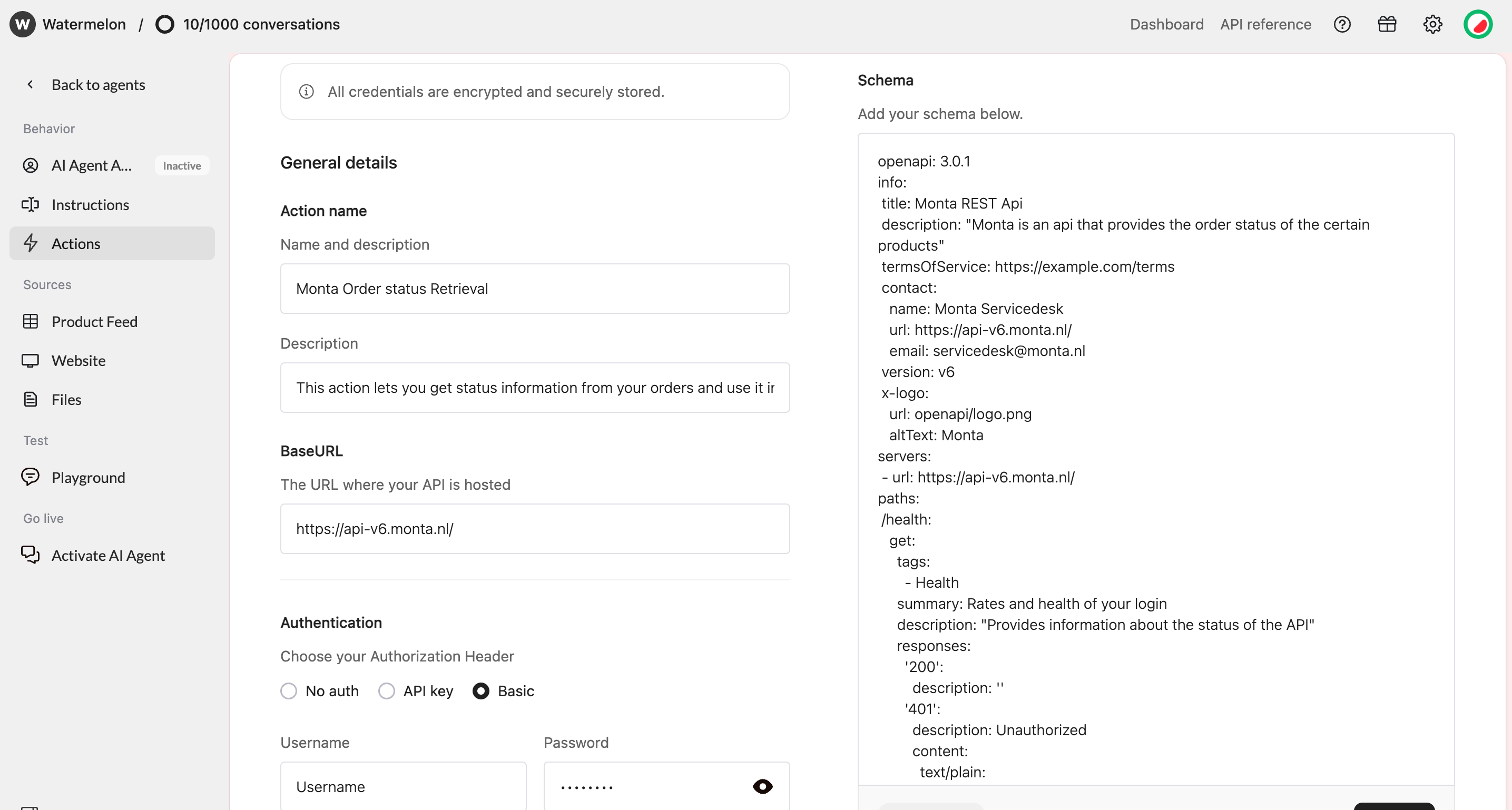
Editing an Action Template
After setting up an Action, you can adjust it to your use case. For example, you can add endpoints to the schema, change parameters, or update the name and description. Be careful when changing authentication settings or existing endpoints, as this can prevent the Action from connecting to the API.Troubleshooting
| Issue | Likely cause | What to check |
|---|---|---|
| Validation failed | Invalid OpenAPI schema | Check the schema for missing or unsupported fields. |
| 401 Unauthorized | Incorrect credentials | Check your API key, token, username, or password. |
| 404 Not Found | Incorrect endpoint | Check the BaseURL and endpoint path. |
| Action does not return the expected data | Schema or parameter mismatch | Check the endpoint parameters and API response structure. |
| Health check fails | Health check endpoint cannot be reached | Check the Health check URL and authentication. |