A chatbot quickly catches 85% of all your customer contact and is therefore an indispensable tool in the world of customer service. It can be hard, though, to determine where contact with the digital colleague begins and where it ends. That is why in this blog we explain how to work efficiently with your chatbot, which options there are and how to build a chatbot.
Full automation VS cooperation between human and chatbot
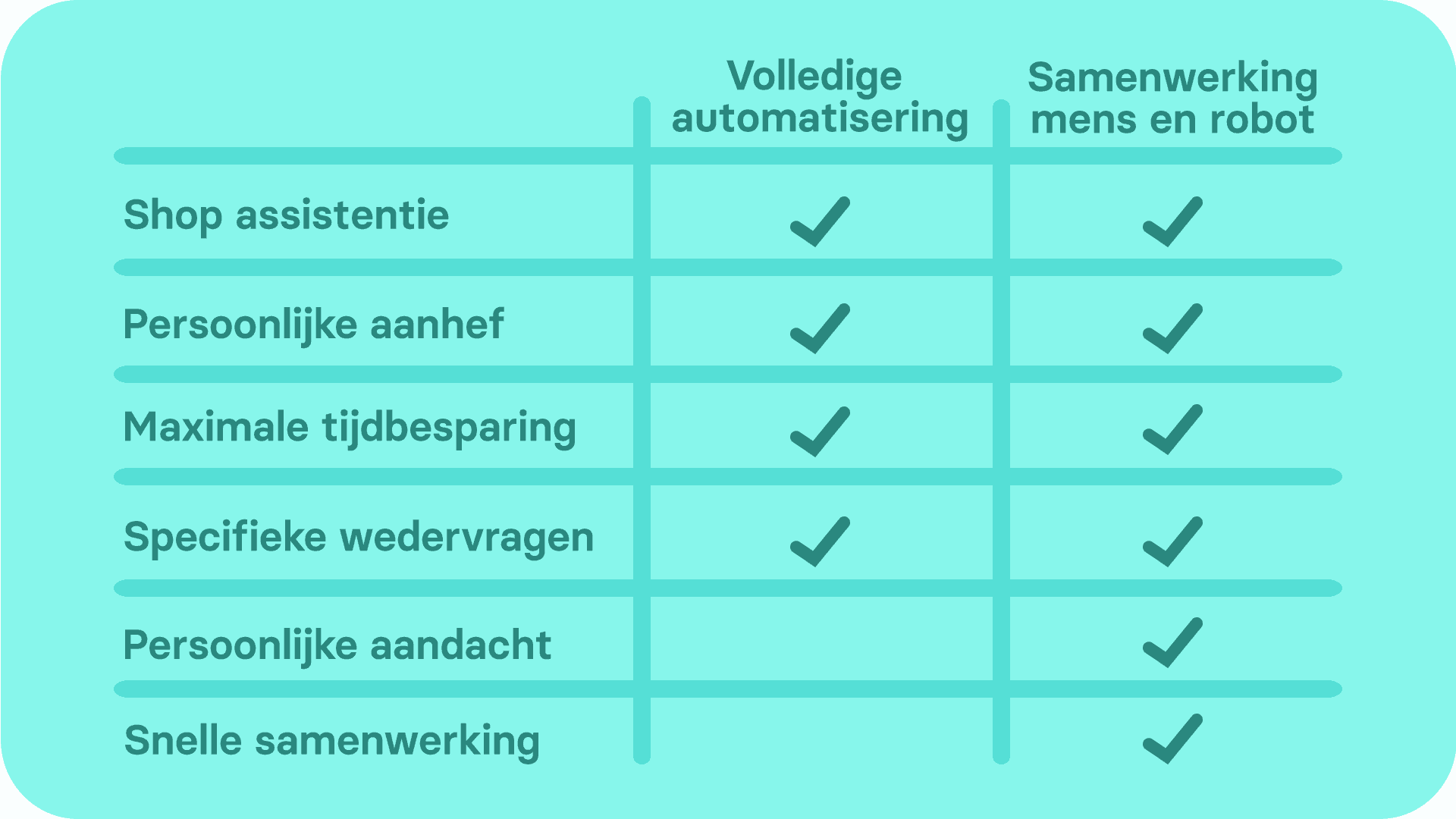
You can choose to leave your customer service entirely to a chatbot and thereby automate your service completely. When you would rather offer an extra personal service, this is of course not an option. That is why many companies choose to use a hybrid model, in which both human and chatbot play a part in all-encompassing customer service software. What the difference between these models is exactly, we explain in this blog. Would you like to see a full overview of the differences? Then take a look at the table below.
Full automation
With full automation a chatbot holds the whole conversation with the customer. Here you choose a closed or open model, or a combination of the two. This means a customer asks all the questions themselves (an open model), only clicks on a menu (a closed model) or comes across both of these options during the conversation (a hybrid model). A closed model is the most common with full automation. When a customer is free to ask a question they have formulated themselves, as with an open model, the chatbot has to be trained so intensively that it can give an answer to every question. The biggest advantage of full automation is the amount of time you save. A disadvantage is that customers with more complicated questions end up phoning anyway, because they do not get a complete answer through the chatbot.
Cooperation between human and chatbot
With cooperation between a human and a chatbot, you do enjoy the benefits of a chatbot, but you also offer that little bit of extra service through your customer service staff.
All first-line customer contact is then caught by the chatbot: this means the customer speaks to the chatbot first, regardless of the channel the customer comes in on with the question. Only from the moment a chatbot does not know the answer to a question does the bot pass the conversation on to a human member of staff.
You also easily connect a chatbot to your CRM system, which lets the bot ask for important information from a customer in advance. That way you find out their contact details and the subject of their question, so that your chatbot can forward the conversation straight to the right member of staff. The only disadvantage of this is that you do not save as much time as with full automation. A big advantage is that your customers always find a good answer with you, and email and telephony decrease.
What is the most efficient way to work together?
So how do you let your staff and chatbot work together optimally? With the tips below you make sure your customers are dealt with quickly, efficiently and personally:
Look at data
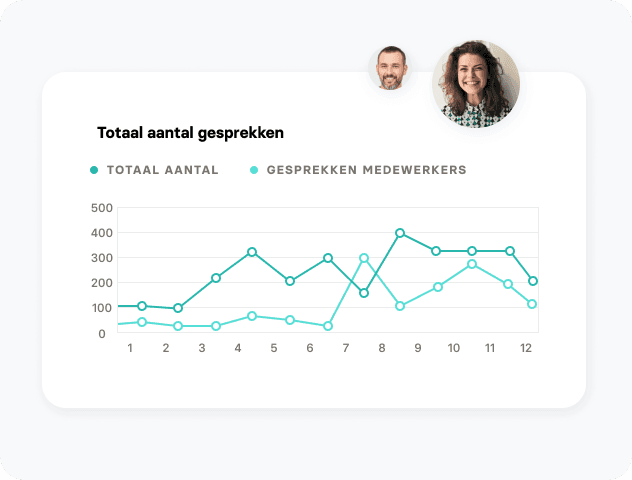
When you are choosing between a cooperation between human and chatbot, you find the most efficient way of working together by analysing the data properly. When you use a chatbot platform, you get access to various statistics, including information about your customer service's peak hours. This tells you exactly how many customer service staff you should deploy during the day. You also see how long conversations with a chatbot last and where people drop out. By looking at this you know at which points you should optimise your chatbot. It is also important to keep asking your custo
mers for feedback constantly. That way you know exactly what they are and are not satisfied with and you deliver the perfect service for your customer.
Personal service
Have your chatbot request relevant details that the member of staff needs to be able to help the customer quickly. You can have the chatbot request all sorts of details, after which the bot can forward the conversation to a member of staff who can get to work with these details straight away. Should a customer want to receive the trousers she ordered in size 36 rather than 38, for example, the chatbot requests her details, and a customer service agent only has to change the size of the order. This way you deliver a fast service and can work in a customer-centric way.
Switching from bot to member of staff
An optimal cooperation comes in very handy when you set the chatbot to forward the conversation to a member of staff after two unlearned questions. If a customer, after asking two questions, has the feeling of not yet having been helped properly, then that customer deserves extra attention from a member of staff. There are also suggestion bots, which you can deploy during live chatting. The suggestion bot offers the member of staff answer suggestions on the basis of the knowledge the bot contains. That way the member of staff can give an answer quickly, without having to type much themselves.
Why a cooperation between chatbot and human?
A chatbot and a human member of staff can complement each other optimally in order to offer a good service to your customers. Although there are many different facets that make a customer service successful, and the priorities lie differently for every company, there are a number of aspects that matter for every webshop. A personal service, for example. A customer no longer settles for a ‘Dear Sir/Madam’; a name has to be attached to it. You can have your bot request this name, so that a member of staff knows straight away that ‘customer 4260’ is actually Tim from Houten. Catching frequently asked questions is a goal we often see coming past too; many customer service staff are fed up with copying and pasting answers to the same questions every time. A chatbot can answer these questions directly at lightning speed, so that the member of staff can concentrate on the trickier issues.
How do I build a chatbot?
You build a chatbot easily and without programming on the chatbot platform from Watermelon. You start by building conversation trees. This lets you steer the conversation with a customer, as it were. Then you add more and more information to your chatbot's brain. Once the chatbot is live, customers will ask questions the chatbot does not understand. These questions are called “mismatches”. You clear them away easily in the platform, so that the chatbot does understand these questions next time.
The platform offers your customer service team the possibility of working together seamlessly (with the chatbot). Questions from all the popular social media channels come in on a single conversation overview, which means you easily pick them up or forward them to colleagues. Raise your customer satisfaction in no time through this fast service. Would you like to know more about how to deploy a chatbot successfully? Then click the download whitepaper button at the bottom here.


